

The best AI research assistant depends on the research phase. Use Atlas to work across papers you have already chosen, with answers that cite the passage they used. Use Elicit to pull the same data out of many papers, Consensus for quick checks against published studies, and Scite to see whether later work supports or disputes a source. Semantic Scholar and Research Rabbit are the free ways to find papers in the first place.
Most researchers end up using two or three of these. This guide compares seven tools from their official pages and help docs, names the job each one does best, and shows how to check any answer before you cite it.

Synthesize research papers with citations
Upload selected papers after discovery and inspect citations behind each answer.
AI research assistants compared
This table matches each tool to the research phase it is built for. The last column names the check to make before you reuse an answer.
| Tool | Research phase | How answers link to sources | Paper search | Free use |
|---|---|---|---|---|
| Atlas | Working across a chosen paper set | Citations open the passage in your uploaded file | Semantic Scholar and OpenAlex search inside Atlas | Free plan |
| Elicit | Pulling data out of many papers | Sources shown for answers | 138M+ papers | Basic plan |
| Consensus | Quick checks against published studies | Cited papers per answer | 400M+ papers | Free access |
| Scite | Checking how later work cites a paper | Smart Citations show supporting or contrasting statements | Citation index | 7-day trial |
| SciSpace | Reading and explaining papers | Citation-linked answers from sections of a PDF | Academic paper index | See its pricing page |
| Semantic Scholar | Finding papers | Paper records and TLDR summaries | 200M+ papers | Free |
| Research Rabbit | Mapping related papers | Citation-network links, no generated answers | 310M+ articles | Free plan |
Table 1: Seven AI research assistants by research phase, source links, paper search reach and free access, from each vendor's own pages in October 2026.
How we compared these tools
We read each tool's official product, pricing and help pages in October 2026 and recorded what they say about sources, search reach, exports and price. We did not run a scored accuracy test, so this guide does not rank tools by error rate. Where a page did not state something, the table says so or leaves it out.
The useful question for academic work is not how many features a tool has. It is whether you can open the source behind each answer and read it in context. Each tool section below says how that check works in that tool.
Check an AI answer before citing
Use the same three checks on any tool:
- The source exists. Open the cited paper and confirm the title, authors and year in a database such as Semantic Scholar, PubMed or Crossref.
- The source says it. Find the sentence or table the answer relies on.
- The answer keeps the meaning. Compare the answer with the passage. Watch for a claim that is stronger, broader or reversed.
If an answer fails any check, drop the claim or rewrite it from the source.
Buying questions for each tool
For each tool we looked at eight buying questions. Can it chat with papers? Can it help with literature review work? Can it export citations? What does it say about privacy and model training? Does it connect to academic databases? Can teams use it? Does it help check facts? What does it cost?
The idea behind the source check comes from retrieval-augmented generation. The original RAG paper showed why answers grounded in retrieved text are easier to check than answers from model memory alone.
The 7 Best AI Research Assistants
The ranked entries below cover the seven academic research assistants in this guide. Each entry names the job it does best, where it falls short, and the research phase where it belongs.
- Atlas: best after your paper set is ready. Answers cite the passage they used, and maps show ideas across papers.
- Elicit: best for table-based data pull across many papers. It is fast for methods and outcomes, but built around a fixed question.
- Consensus: best for quick checks against published studies. It is useful during writing, but it is not a full review workspace.
- Semantic Scholar: best as the free paper search layer. It has broad reach and TLDRs, but it does not pull the final argument together.
- Scite: best for checking whether later papers support or dispute a source. It is strong for source review, but not for synthesis.
- Research Rabbit: best for finding related papers from a seed paper. It makes paper maps fast, but it does not answer questions.
- SciSpace: best for reading and explaining papers. It has PDF chat with citation-linked answers.
1. Atlas: Best for cross-paper synthesis
Atlas is built for the work that starts after you have the papers. Add PDFs, web pages and notes to a project, or search Semantic Scholar and OpenAlex from inside Atlas and add papers by DOI, arXiv ID or PubMed ID. Then ask questions across the set. Each answer cites the passage it used, and the citation opens that spot in the PDF. The broader AI tools for academic research guide separates that synthesis job from paper discovery, citation checks and academic editing.
A semantic map lays out the topics across a project's papers, and you can open a knowledge map for any single source or note. Both help you see how papers relate before you write. For corpus mapping in general, see our knowledge graph guide.
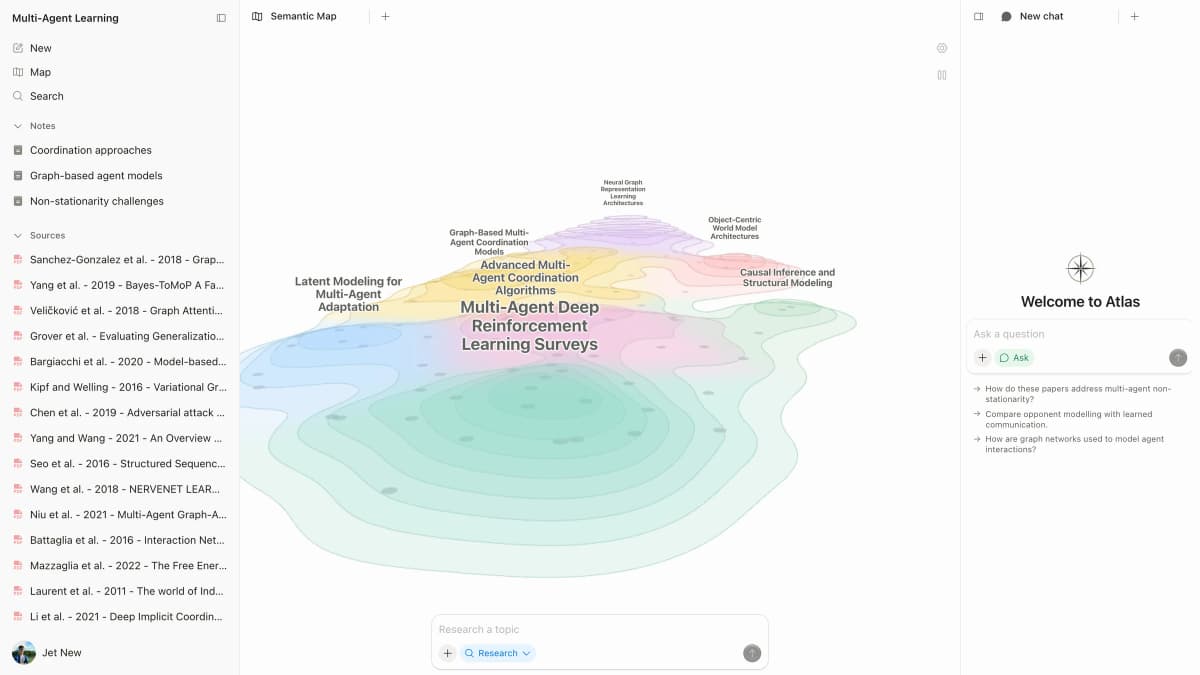
The first-party Atlas capture shows papers, a semantic map, and research chat in one project.
The tradeoff is reach. Atlas search covers Semantic Scholar and OpenAlex records, but Research Rabbit goes further on citation networks and Elicit on structured extraction. Atlas has a Free plan with up to 10 sources and 5 AI messages. Plus is $20 a month with hundreds of AI messages a month and up to 1,000 sources, and Pro is $40 a month with twice Plus's AI usage and up to 10,000 sources.
- Pros: citations that open the passage, questions across many papers, maps across a project.
- Cons: you build the paper set first, and it has no extraction table like Elicit's.
- Use case: after paper search, use Atlas to pull the source set together and check each passage before writing.
2. Elicit: Best for data extraction
Elicit's main feature is the data table. You define the columns you need, such as sample size, method, key findings and effect direction. Elicit fills one row per paper, so a reviewer can compare the same field across studies.
Elicit has chat with papers, but the extraction table is the center of gravity. It offers semantic search and bulk extraction for systematic reviews. Its pricing page lists search across more than 138 million papers on the free Basic plan, plus Zotero import. Pro is $49 per user a month.
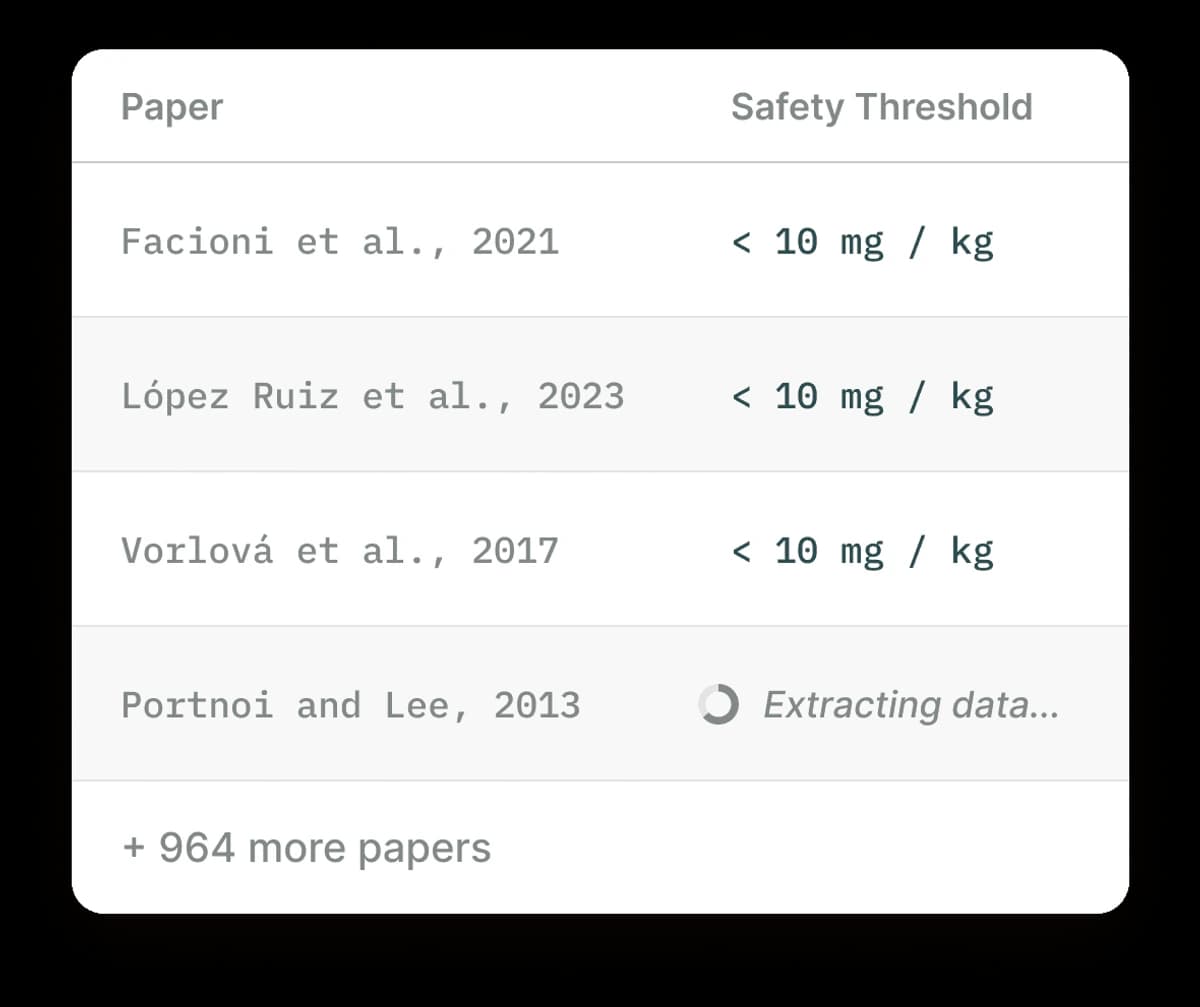
The screenshot shows one extraction field, Safety Threshold, filled across three paper rows while a fourth row is still processing. The interface also notes 964 more papers. This row-by-row layout lets a reviewer compare the same field across studies.
Use Elicit when the review question is already fixed. If your task is "find 200 papers, pull the methods and outcomes, and build a table," it is the best fit here. It is weaker for open search because it needs a defined table schema.
- Pros: fast paper extraction, clear tables, Zotero import.
- Cons: open-ended review work is weaker than table-based data pull.
- Use case: build the evidence table for a review before writing the argument.
3. Consensus: Best for evidence-grounded answers
Consensus calls itself an AI academic search engine for peer-reviewed literature and says it searches more than 400 million papers. It answers plain-language questions such as "does fasting reduce visceral fat?" Its Consensus Meter shows how much the papers agree on a yes or no question.
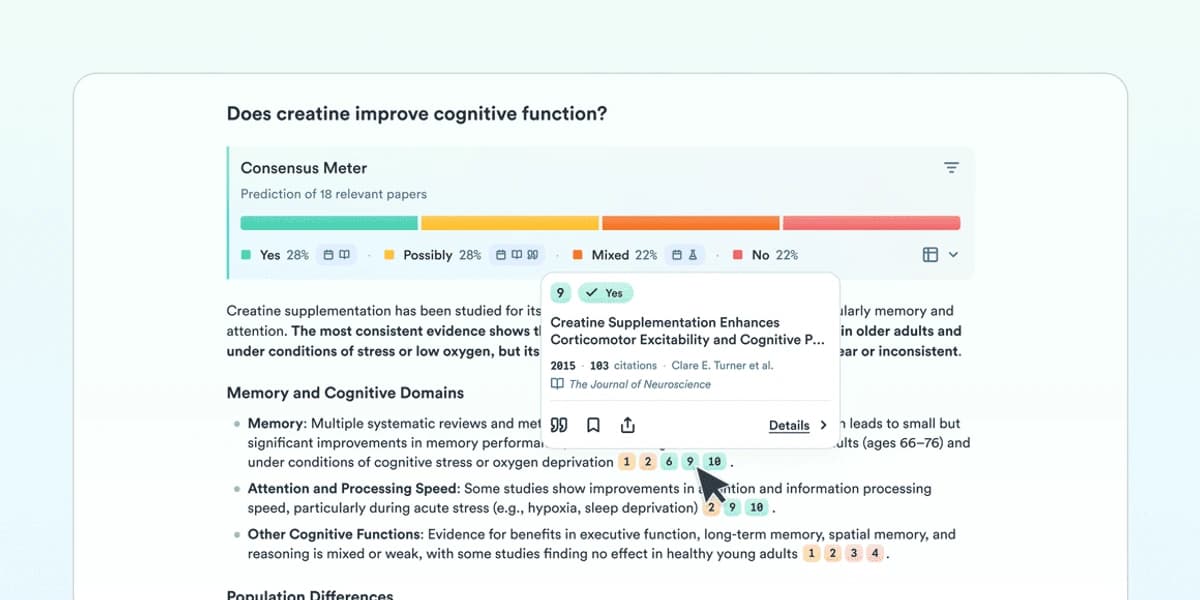
This screen shows how one query is summarized across its cited papers. The percentages apply to that query only. Source: Consensus.
Consensus is best for quick evidence checks during writing. The meter is useful because it flags questions where papers disagree. That keeps you from citing one paper as settled fact.
The limits are clear. Consensus answers single questions. It is not a review management workspace, and it struggles with theory-heavy or qualitative work because it needs an empirical question. Consensus offers free access. Check its pricing page for paid plans.
- Pros: published-study scope, fast evidence checks, useful Consensus Meter.
- Cons: not built for full review management.
- Use case: check one empirical claim before you cite it.
4. Semantic Scholar: Best free discovery
Semantic Scholar comes from Ai2, the non-profit research institute, and says it indexes more than 200 million academic papers. It is free, and paper pages carry TLDR summaries that make screening faster.
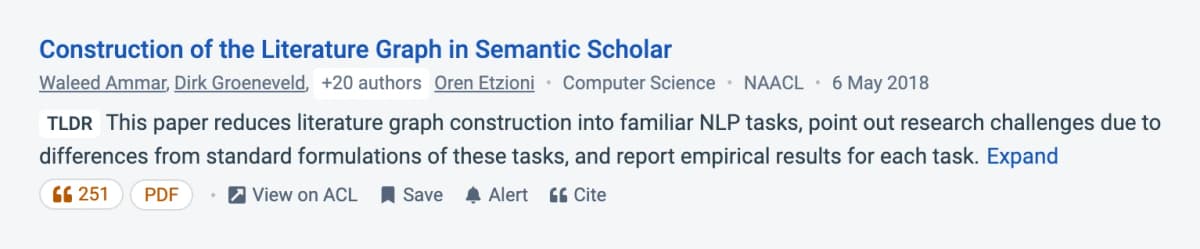
The paper page places a short summary beside citation and export actions. Source: Semantic Scholar.
Semantic Scholar stands out on breadth. Use it during paper search, especially when you need free coverage across a large graph. It exports BibTeX and RIS and keeps personal libraries with alerts.
It is not a tool for pulling ideas together once you have the papers. Move results into Atlas or Elicit when search turns into analysis.
- Pros: free paper search, broad reach, useful TLDRs.
- Cons: weak at pulling ideas together after papers are chosen.
- Use case: build the first reading list and set alerts.
5. Scite: Best for citation checks
Scite shows how later research has supported, challenged or discussed a paper. Its Smart Citations show the citing sentence and whether it supports or contradicts the claim. That is the difference between citing a paper that later work backs and citing one that later work disputes.
Run Scite before a citation lands in your final draft. If recent literature has contradicted the cited finding, Scite is the tool most likely to show it. It is not a discovery, extraction or synthesis product. Scite's pricing page lists Basic at $12 a month billed yearly and Pro at $40 a month billed yearly, each with a 7-day free trial.
- Pros: citation context, support and contrast flags, audit value for teams.
- Cons: not a paper search or writing workspace, and no permanent free plan.
- Use case: audit key citations before submission.

6. Research Rabbit: Best for paper maps
Research Rabbit takes a visual approach: feed it a few seed papers, it maps the citation network, and you explore by clicking. It is a good way into a new field.
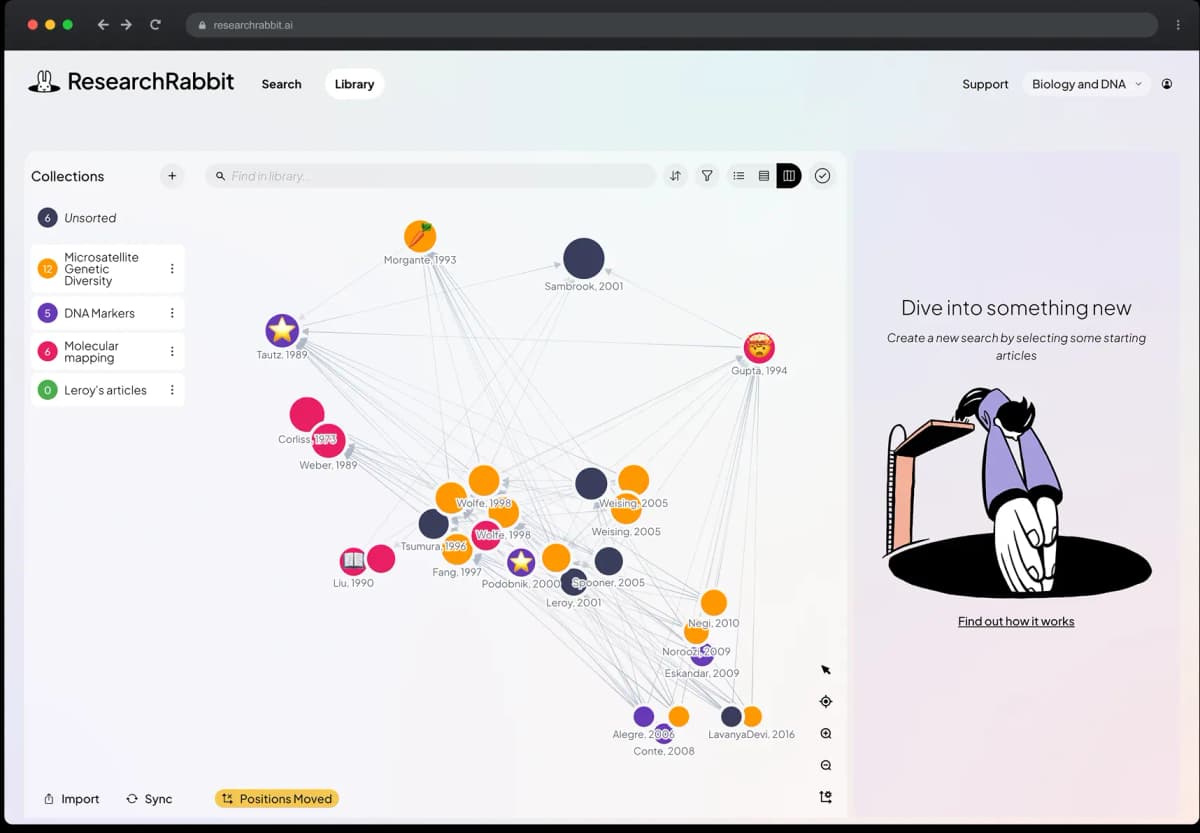
The graph is the product's visual route for exploring papers related to a starting set. Source: ResearchRabbit.
Research Rabbit is not a chat tool. Its pricing page lists a free plan with unlimited searches across 310+ million articles, shared collections and up to 50 seed articles. RR+ is $10 a month billed yearly and raises the seed limit to 300.
The best use case is "I have one paper, what else should I read?" Once you have the paper set, pair it with Atlas or Elicit for the next step.
- Pros: visual paper maps, fast seed-paper expansion, free plan.
- Cons: no answers generated from the papers.
- Use case: enter a new field from a seed paper set.
7. SciSpace: Best for paper reading
SciSpace Chat PDF lets you upload a PDF, ask a question and get citation-linked answers from specific sections of the paper. It also offers literature-review tools and a large paper index. It fits the reading layer between paper search and final synthesis.
SciSpace is strongest when you need to understand one paper quickly. It is weaker than Atlas for questions across a private paper set, and weaker than Elicit when you need strict data tables.
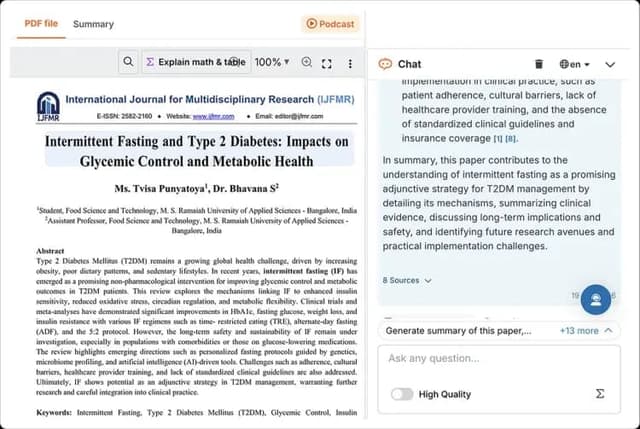
This official SciSpace 2026 product image shows the paper-reading and PDF-chat workflow. Source: SciSpace.
- Pros: paper reading, PDF Q&A with citations, broad research index.
- Cons: less suited to questions across your own paper set.
- Use case: read and explain papers before moving the final source set into Atlas or Elicit.
Perplexity and general chat assistants
We do not rank broad web-search assistants as academic research software here. Perplexity, ChatGPT and NotebookLM can surface general context or answer from files you add, and Perplexity shows the web pages behind each answer. They search the open web rather than an academic index, so check every cited paper yourself before using it in science work.
How to Choose Your AI Research Assistant
Most working researchers run 2 or 3 tools. Pick the tool that fits the current phase of work: discovery, extraction, checking or synthesis.
If you already have a paper set, Atlas fits after discovery. If you still need to find papers, start with Semantic Scholar or Research Rabbit.
For Academic Literature Reviews
- Discover with Semantic Scholar (TLDRs and alerts) plus Research Rabbit (citation network).
- Screen and extract with Elicit. Its extraction table is the reason it belongs in this stack.
- Verify before citing with Scite. Run every key citation through Smart Citations before it lands in your draft.
- Synthesize the argument with Atlas. Ask questions across the final set and open each cited passage.
This stack is heavier than a single course paper needs. It fits a thesis chapter or a peer-reviewed submission. Read our complete guide to AI for literature reviews for the detailed workflow.
For Graduate Research
- Ongoing search with Semantic Scholar alerts on your topics.
- Deep reading with Atlas. Add, question and connect papers as you read.
- Quick checks during writing with Consensus when the question is empirical, and SciSpace when you need to explain a paper.
- Before you submit, run Scite on every cited finding.
For Professional and Industry Research
- Fast cited answers from Consensus for questions about published studies, and SciSpace for paper reading.
- Deep dives across reports in Atlas. Add the analyst reports, technical notes and PDFs you already have, then ask across them.
- Academic evidence layer from Elicit when a decision needs structured evidence.
For Students
- Course papers: Semantic Scholar (free) for finding sources, Atlas (Free plan, or Plus at $20 a month) for understanding and connecting them.
- Exam preparation: Atlas for questions across lecture notes, slides and readings.
- Quick references during writing: Consensus or SciSpace.
- Single-PDF chat: see our chat-with-PDF AI tools roundup for lighter options.
What AI research assistants still cannot do
Three limits recur across every tool in this guide. They mark the line between tasks you can hand off and tasks you cannot.
No tool can reliably judge whether a study design fits the research question. Sample size, control groups and field fit still need human expertise. Scite gets closest by showing citation context, but the judgment is still yours.
No AI tool searches every database. Systematic reviews submitted to peer review still need a documented database search alongside the AI workflow. See our guide to AI systematic review tools.
A paper can be highly cited and still be weak. AI tools cannot make that quality call for you. Scite's contrasting label helps, but it still depends on your reading. For more, see AI tools that don't hallucinate and AI with references.
Privacy and training data
Ask these questions on each provider's own privacy page before you upload sensitive work:
- Is uploaded content used to train models? Look for a plain statement for your plan.
- Is the upload encrypted in transit and at rest?
- What happens to your files when you delete them or cancel?
- Does the provider store your queries, and can you opt out?
For Atlas, the privacy policy is the legal source, and you can delete your account and its projects, notes, sources and chats from Settings. For drafts, clinical data or private company work, follow your institution's rules on cloud tools.
Migration: how to move between research stacks
Researchers often ask how to switch without losing a library. Three patterns work.
When moving from Zotero or Mendeley into an AI tool, keep your reference manager as the record and export the PDFs you need. Elicit imports from Zotero. In Atlas, upload the PDFs or add papers by DOI. See our Zotero alternatives guide for the longer comparison.
When moving from one AI tool to a stack, keep the discovery layer the same and swap the synthesis tool. Semantic Scholar can remain the front door.
When leaving an AI tool, export what you wrote and keep the original files. Links, clusters and maps the tool built are derived from your papers, so you can rebuild them in the next tool.
Which AI research assistant to start with
For a researcher new to AI tools, start small:
- Semantic Scholar: free; set up alerts on your topics.
- Atlas: add the papers you already have, ask one question across them, and open each citation.
- One specialist: Elicit for review tables, Scite for citation checks, Consensus for quick evidence checks, or SciSpace for reading papers.
Whichever tool you pick, use the three source checks above before a claim reaches your draft.
For more on research stacks, see AI tools for academic research, AI for literature reviews, and how to synthesize research papers. For nearby tool sets, see Elicit alternatives, literature review software, and academic research software platforms.
For tool-by-tool detail, compare Atlas with ChatGPT, Claude, Gemini, and Perplexity. Then compare research tools such as Covidence, Elicit, Scite, and Semantic Scholar. If your workflow starts from PDFs, the ChatPDF alternatives guide narrows the document-chat category.
Synthesize research papers with citations
Upload selected papers after discovery and inspect citations behind each answer.