
Best Note-Taking Apps for iPad (2026): 8 Apps Tested
The best note taking apps for iPad in 2026, tested with Apple Pencil. GoodNotes, Notability, Noteful, Apple Notes, Notion, Obsidian, and OneNote compared.
- Byline

Summary
GoodNotes and Notability lead iPad pen notes. Use Atlas later for cited answers from exported notes and PDFs.
GoodNotes is the safest class-notes pick. Notability wins when recorded lecture audio matters.
Use Apple Notes for free quick notes. Use GoodNotes for class notes. Use Notability for lectures. Use Noteful to save money.
Pick based on pen depth, PDF tools, sync, and whether exported notes need cited answers.
The iPad is the main note-taking tablet in 2026, with 80%+ of premium tablet shipments since 2018. Apple Pencil 2 made pen lag hard to notice around 2018.
That split the market into two groups. GoodNotes and Notability are built for ink. Notion, Obsidian, and Atlas are cross-device note tools that accept Apple Pencil Scribble for text.
This guide ranks 8 iPad note-taking apps tested across the four jobs people use an iPad for. The non-obvious finding from our iPad Air M2 test: Pencil latency no longer separates the winners on current hardware.
Export quality, offline behavior, and whether the app preserves searchable text mattered more than raw pen feel after the first few minutes.
Atlas is not ranked as a primary iPad handwriting app because it does not support native Apple Pencil ink. It appears only as a follow-on option when exported notes and PDFs need source-grounded synthesis.
Choose by device or study context: Stay here for iPad and Apple Pencil. Use the stylus comparison for S Pen, Surface Pen, or mixed tablet fleets. Use the student guide for broad school needs and the college guide for lectures, majors, and multi-year coursework.
One test result changed the order. In my Wi-Fi-off pass, GoodNotes, Notability, Noteful, Apple Notes, Obsidian, OneNote, and Noteshelf reopened recent notes cleanly. Notion and Atlas were weaker because their best workflows assume cloud access.
 Atlas
AtlasAtlas as a post-capture synthesis option
Compare AI tools that return references you can open and verify.
How We Tested
I tested each app on an iPad Air M2 with Apple Pencil 2. The test covered lecture notes, PDF markup, sync, and AI.
For lecture notes, I checked speed, pen feel, palm rejection, and page moves. For PDFs, I checked markup tools, highlights, and search. For sync, I checked the same notes on iPhone, Mac, and web. For AI, I checked pen-note search, summaries, and Q&A.
We also checked current App Store data on June 30, 2026. iPad note apps now differ by OS support, privacy labels, and ratings as much as by pen feel. Those facts can change faster than the writing surface, so they sit in their own tables below.
Field-Test Results
This is the practical scorecard from the iPad Air M2 test pass. Each app went through the same workflow. I made a class notebook and wrote two pages with Apple Pencil. Then I marked up a 12-page PDF, switched Wi-Fi off, reopened recent notes, and exported the result.
| App | Handwriting | PDF Markup | Audio | Offline | Export | Test Note |
|---|---|---|---|---|---|---|
| GoodNotes 6 | 5/5 | 5/5 | 2/5 | 5/5 | PDF, image, Goodnotes file | Best balance for class notes |
| Notability | 5/5 | 4/5 | 5/5 | 5/5 | PDF, note bundle | Best lecture replay |
| Noteful | 4/5 | 4/5 | 3/5 | 5/5 | PDF, Noteful format | Best lower-cost ink app |
| Apple Notes | 4/5 | 3/5 | 2/5 | 5/5 | PDF, share sheet | Fastest free capture |
Table 1: Pen-first apps were tested for ink feel, PDF markup, audio, offline access, and exports.
| App | Handwriting | PDF Markup | Audio | Offline | Export | Test Note |
|---|---|---|---|---|---|---|
| Notion | 2/5 | 2/5 | 1/5 | 2/5 | Markdown, CSV, HTML | Strong structure, weak ink |
| Obsidian | 2/5 | 2/5 | 1/5 | 5/5 | Markdown folder | Best long-term files |
| OneNote | 4/5 | 4/5 | 3/5 | 4/5 | PDF, OneNote notebook | Best free canvas |
| Noteshelf | 4/5 | 4/5 | 2/5 | 5/5 | PDF, image | Paper-notebook feel |
Table 2: Typed and mixed-workflow apps used the same iPad Air M2 test pass.
Export changed the recommendation more than Pencil latency. GoodNotes, Notability, Apple Notes, OneNote, and Noteshelf all feel good enough with Apple Pencil on current iPads. The harder question is simple. Can your notes leave the app as PDFs, Markdown, or source files when one class or project outgrows one notebook?
Quick Picks by Workflow
Start with how you take notes day to day. If most of your notes are written by hand, choose a pen-first app. If most of your notes are typed, choose the app that keeps text easy to find and move. The feature list matters less than the fit.
-
GoodNotes 6: Choose it for a tidy school notebook, worksheets, and marked-up PDFs.
-
Notability: Choose it when audio replay matters. Tap what you wrote, and the app can take you back to that part of the talk.
-
Noteful: Choose it for a lighter pen app with ink, tabs, PDF markup, and fewer extras.
-
Apple Notes: Choose it when you want the free app already on the iPad for quick notes, lists, sketches, and light schoolwork.
-
OneNote: Choose it for a free page that grows in any direction, especially diagrams and mixed text with ink.
-
Notion: Choose it when the note belongs beside a project, task list, or database.
-
Obsidian: Choose it when you want plain files that you can keep for years.
-
Noteshelf: Choose it when you like paper notebook layouts and want a fallback to GoodNotes or Notability.
The cohort splits cleanly by workflow. For handwritten lecture notes, GoodNotes 6 is still the default. Pick Notability instead if audio replay matters more than templates. For lower-cost pen notes, Noteful is cleaner than forcing the job into a typed-notes app.
For typed research notes, Notion wins on databases and Obsidian wins on linked files. For freeform boards, OneNote's canvas is still the iPad standout. For quick capture, Apple Notes still wins from the lock screen. For PDF markup, GoodNotes and Notability are close, with GoodNotes ahead on search inside margin notes.
Top iPad Note-Taking Apps
Start with the job, then check the trade-off. GoodNotes is best for tidy class notebooks. Notability is best when lecture audio matters. Noteful is the budget pen app.
Apple Notes is the free default. Notion is for project notes and databases. Obsidian is for plain files. OneNote is for a free canvas. Noteshelf is for a paper-style notebook.
1. GoodNotes 6: Best for Student Handwriting
GoodNotes 6 is the category leader for student handwriting on iPad. The 2023 redesign added AI features, handwriting-to-text search, AI spell-check, and a templated note layout. Subscription model ($9.99/year) replaced the one-time purchase.
- Best fit is students who mark up slides, worksheets, and PDFs by hand.
- Trade-off is weaker lecture replay than Notability and paid AI for Q&A.
Pricing: $11.99/yr Essential, $35.99/yr Pro, or $35.99 one-time for the base app.
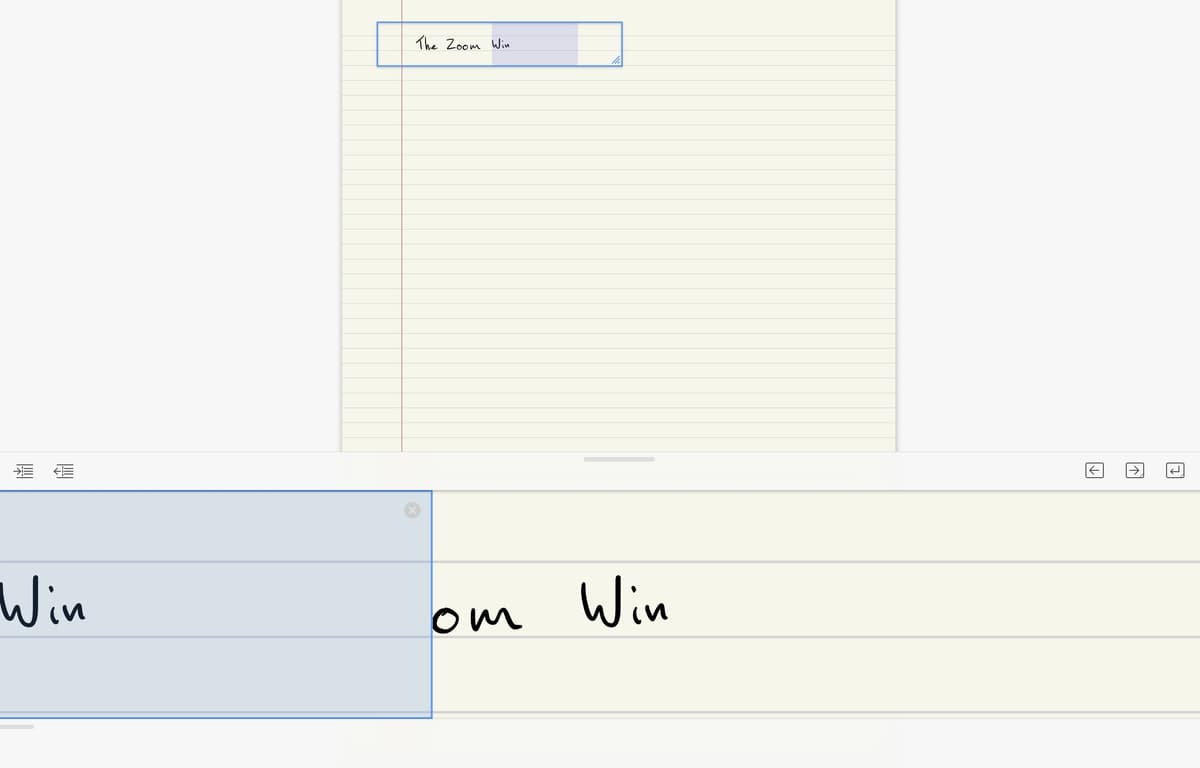
Goodnotes' support screenshot shows the Zoom Window, a writing aid for smaller handwriting on iPad. That is the kind of pen-first tool that keeps Goodnotes ahead for class notebooks. Image source is Goodnotes Support.
2. Notability: Best for Lecture Audio
Notability's key feature is audio tied to handwritten notes. Tap a word, and Notability replays the sound from when you wrote it. That is the main reason to pick it for class.
- Best fit is classes or meetings where replaying the talk matters.
- Trade-off is a higher Pro price if you want the newer AI tools.
Pricing: $20/yr Plus, $99/yr Pro.
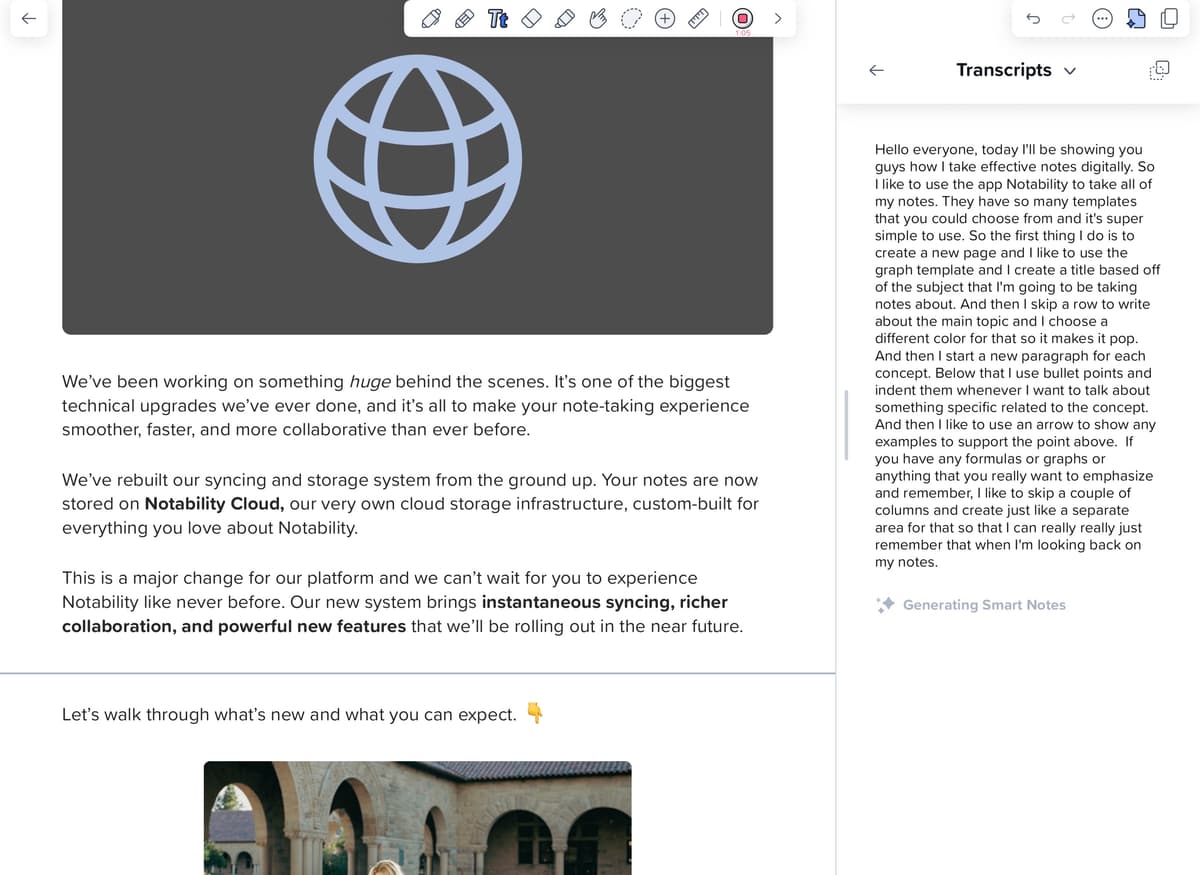
Notability's support screenshot shows the live transcript panel beside a note during recording. That audio-linked workflow is the main reason to choose it for lectures. Image source is Notability Support.
3. Noteful: Best Lower-Cost Handwriting App
Noteful is the best fit if you want a handwriting-first iPad app without moving straight to GoodNotes Pro or Notability Pro. It supports Apple Pencil ink, layers, PDF markup, tabs, and audio recording. Its App Store listing shows a free download with optional in-app purchases.
- Best fit is a budget pen notebook with tabs, layers, and PDF markup.
- Trade-off is fewer mature study and AI features than the larger suites.
Pricing: Free download with in-app purchases.
4. Apple Notes: Free iPad Notes
Apple Notes added Apple Intelligence in 2024-2025, including summarization, smart folders, math notes, and handwriting search. It is free with iCloud, supports native Apple Pencil input, and syncs across iPhone, iPad, and Mac. For the broader option set, see Apple Notes alternatives.
- Best fit is quick free capture inside the Apple ecosystem.
- Trade-off is weak bulk export when you outgrow one note at a time.
Pricing: Free with Apple ID.
5. Notion: Best for Notes Plus Databases
Notion on iPad supports Apple Pencil Scribble for handwriting-to-text input. Notion AI can answer questions across pages. It is strong if you need notes plus project management plus databases, and weaker if native handwriting is the main job.
- Best fit is typed notes tied to projects, tasks, and shared databases.
- Trade-off is weak native ink and limited offline confidence.
Pricing: Free tier, Plus $10/month.
6. Obsidian: Best Plain-Text iPad Notes
Obsidian on iPad runs the same vault as your Mac: Markdown files, links, and plugins. Handwriting requires plugins, so the native experience is typed text. Choose it when data portability matters.
- Best fit is long-term notes you want to keep as plain files.
- Trade-off is a less iPad-native feel unless you enjoy setup work.
Pricing: Free for personal use.
7. Microsoft OneNote: Best Free Infinite Canvas
OneNote's iPad app supports an infinite-canvas page model. You can drag handwriting and text almost anywhere. It is free with a Microsoft account and syncs to OneNote on Mac, Windows, and web.
- Best fit is free mixed notes with ink, typing, diagrams, and space to sprawl.
- Trade-off is messier page order and export than strict notebook apps.
Pricing: Free with Microsoft account.
8. Noteshelf: Best One-Time-Purchase Handwriting App
Noteshelf is a strong pen-note app for people who want a classic notebook feel. It is less busy than GoodNotes and less audio-led than Notability. Noteshelf 3 is free to try on the App Store. Premium features are sold through in-app purchases rather than one fixed price.
- Best fit is a paper-like notebook with covers, templates, and simple pen tools.
- Trade-off is less category momentum than GoodNotes or Notability.
Pricing: Free download with in-app purchases.
Comparison Table
Use this table as the quick filter. Choose a native Apple Pencil app when pen notes are the work. Choose a typed or AI workspace when search, sync, or source Q&A matters more than ink.
| App | Best For | Paid | Apple Pencil | PDF Markup | Audio | AI Q&A |
|---|---|---|---|---|---|---|
| GoodNotes 6 | Student notes | $11.99/yr Essential, $35.99/yr Pro | Native | Strong | Basic | Limited |
| Notability | Lecture notes | $20/yr Plus, $99/yr Pro | Native | Strong | Strong | Limited |
| Noteful | Lower-cost ink | In-app purchases | Native | Strong | Basic | No |
| Apple Notes | Free capture | $0 | Native | Basic | Basic | Apple Intelligence |
Table 3: Pen-first apps differ most on audio replay, PDF handling, and how much AI sits behind a paid plan.
| App | Best For | Paid | Apple Pencil | PDF Markup | Audio | AI Q&A |
|---|---|---|---|---|---|---|
| Notion | Notes + databases | $10/mo | Scribble | Weak | Weak | Yes |
| Obsidian | Plain text | $0 | Plugin | Weak | Weak | Plugin |
| OneNote | Infinite canvas | $0 | Native | Strong | Basic | Limited |
| Noteshelf | Paper notebooks | In-app purchases | Native | Strong | Basic | Limited |
Table 4: Typed and mixed-workflow apps differ most on structure, file control, offline use, and source Q&A.
iPadOS, Ratings, and App Metadata
Current App Store metadata matters if you are using an older school-issued iPad. Goodnotes has the highest minimum OS requirement in this group, while Obsidian remains the easiest fit for older hardware.
| App | Developer | Current App Store Version | Minimum OS Listed | Apple Pencil Compatibility | US App Store Rating Count |
|---|---|---|---|---|---|
| Goodnotes | Goodnotes Limited | 7.1.0 | iPadOS 18.6 | Native ink | 432k ratings |
| Notability | Ginger Labs | 16.5.2 | iPadOS 17.0 | Native ink | 450k ratings |
| Apple Notes | Apple | 2.0 | iOS/iPadOS 10.0 | Native ink and Scribble | 606k ratings |
| Noteful | Noteful Technologies | 1.4.37 | iPadOS 14.3 | Native ink | 22k ratings |
Table 5: The first App Store group covers the native Apple and pen-first apps checked on June 30, 2026.
| App | Developer | Current App Store Version | Minimum OS Listed | Apple Pencil Compatibility | US App Store Rating Count |
|---|---|---|---|---|---|
| Notion | Notion Labs | 1.7.315 | iPadOS 17.0 | Scribble text input | 87k ratings |
| Obsidian | Dynalist | 1.12.7 | iPadOS 14.5 | Scribble, plugins for ink | 2.6k ratings |
| Microsoft OneNote | Microsoft | 16.111.2 | iPadOS 18.0 | Native ink | 1M ratings |
| Noteshelf 3 | Fluid Touch | 7.3 | iPadOS 17.0 | Native ink | 5.6k ratings |
Table 6: The second App Store group covers cross-platform and notebook-style options checked on June 30, 2026.
The App Store data came from Apple's lookup and product pages checked June 30, 2026. I checked the 8 apps in this guide.
iPad vs Stylus Note Apps
The "for iPad" cohort overlaps with the broader stylus note-taking apps category. The iPad-specific apps still do better with Apple Pencil 2 and iPad page layouts. If you use a Samsung S Pen or Surface Pen, start with the cross-device stylus comparison instead.
What Changed in 2026 Pricing
Two shifts matter beyond the base prices listed in each app section above. GoodNotes split its plan into Essential and Pro. It also added a separate $9.99/mo AI Pass for pen-note Q&A, so AI is outside the base plan.
Notability added a Pro tier ($99/yr) above Plus for AI summaries and math conversion. Notion kept tier prices flat but moved Notion AI from a $10/mo add-on into Business by default. OneNote's consumer Copilot moved to $20/mo Pro. Business stayed at $30/user/mo.
Obsidian added $8/mo Sync as a cheaper choice beside the $50/yr Sync plan. The cheapest useful iPad stack is still Apple Notes plus Obsidian. Pair GoodNotes or Notability with Atlas only when cited source Q&A is worth one more tool.
AI, Privacy, and Export Trade-Offs
How iPad Note Apps Use AI
AI moved from gimmick to default in 2026. GoodNotes Pro and AI Pass let you ask questions across pen notebooks. The model reads your writing and returns text answers with page links. Notability Pro turns recorded lectures and your notes into summaries.
Notion AI drafts pages and answers questions across a workspace. Microsoft Copilot inside OneNote rewrites and sums up typed pages. Atlas fits after capture rather than during handwriting. Export the PDFs you marked up on iPad, upload them with readings or slides, and ask questions that cite the source.
The practical test for any AI feature is simple. Does it show which page supported the answer? If it does not, the answer is still hard to trust.
Near Misses: Craft and Bear
Craft is excellent if you want a native-feeling iPad document editor with polished blocks, media, and distraction-free writing. It missed the top eight because Apple Pencil is not the core capture surface. Craft is better for typed documents than handwritten notebooks.
Bear is the cleanest Markdown-first writing app in this cohort. It is good for focused drafts, tags, and text you can move. Choose a pen-first app when you need PDF markup, class notes by hand, or notes tied to audio.
Privacy, Offline Use, and Accessibility
The biggest non-obvious trade-off is where your notes live. Students usually care about price and pen feel. Professionals should also check offline access, export, data labels, and whether the app fits their organization's review process.
| App | Offline Access | Privacy Posture | Accessibility Notes |
|---|---|---|---|
| Goodnotes | Strong after sync | Optional cloud sync, with AI using cloud processing | Ink is harder for screen readers |
| Notability | Strong after sync | Cloud sync, AI, and audio add cloud dependency | Audio replay helps review |
| Apple Notes | Strong local/iCloud notes | Best Apple-only posture with iCloud controls | Strong VoiceOver and Scribble |
| Noteful | Strong notebooks | Syncs through chosen cloud services | Similar ink caveat as Goodnotes |
Table 7: Pen-first apps keep recent notes available offline. The main privacy question is which cloud handles sync, audio, and AI.
| App | Offline Access | Privacy Posture | Accessibility Notes |
|---|---|---|---|
| Notion | Limited offline cache | Cloud workspace, with team controls depending on plan | Good for typed notes |
| Obsidian | Strong local files | Local-first, with paid sync optional | Markdown is accessible |
| OneNote | Strong after notebooks open | Microsoft account or tenant storage | Good typed access |
| Noteshelf | Strong notebooks | Syncs through chosen cloud services | Similar ink caveat as Goodnotes |
Table 8: Typed and mixed-workflow apps differ most in where files live. Notion is cloud-first, Obsidian is local-first, and OneNote depends on Microsoft storage.
If access needs are strict, choose typed-first or OCR-friendly workflows. Apple documents VoiceOver on iPad as a gesture-based screen reader. A page full of ink still gives assistive tools less structure than typed text. Apple Notes, OneNote, Notion, Obsidian, and exported PDFs in Atlas preserve more text than raw pen notes.
If privacy is the hard requirement, Obsidian's local Markdown vault is the cleanest default. Apple Notes is the best Apple-native middle ground, especially with Advanced Data Protection for iCloud. Cloud AI features should go through the same review you would apply to any SaaS tool.
Migration Tips: Moving iPad Notebooks Between Apps
Migration paths between iPad note apps are uneven. GoodNotes exports to PDF with searchable pen-note OCR baked in, which imports cleanly into Notability, OneNote, Apple Notes, and Atlas. Notability exports notebooks as PDF or .note bundles. The .note format is Notability-only, so PDF is the portable choice.
Apple Notes exports one note at a time as PDF. Bulk migration off Apple Notes is painful and usually means copy-paste. Obsidian's plain-text Markdown is the most portable starting point. Any future app that reads Markdown can import your vault unchanged. OneNote sections export as .one bundles or PDF.
Atlas imports PDFs and Markdown, then rebuilds search and map context across the merged set. That can help when you want one source trail across 3 or 4 apps.
iPad Setup, Troubleshooting, and Next Steps
Accessories That Change the App Choice
The app recommendation changes if the iPad setup changes. A bare iPad with Apple Pencil favors Apple Notes, GoodNotes, Notability, or Noteful because the whole workflow is pen-first. Add a keyboard case and Notion, Obsidian, and OneNote become more practical because typed capture is faster than Scribble.
Add a paper-feel screen protector and pen control improves. Image sharpness and Pencil tip wear get worse, though. It is better for students writing pages of notes than for designers reviewing visual material. Add a USB-C hub or external drive and export quality matters more, because PDFs and Markdown folders can leave the iPad cleanly.
For most students, buy Apple Pencil first and a keyboard second. Add a paper-feel screen cover only if you write a lot by hand. For researchers, buy Apple Pencil first and set up cloud or local backup second. Add a synthesis workspace such as Atlas only after PDFs and pen-note exports start spreading across apps.
Fast Setup Tips
-
Set up the app before you need it in class. Make one test note, add one photo, mark up one PDF, then export the note and check it on another device.
-
Keep each class or project in its own notebook. A clean split by course, client, or month makes it easier to search and back up work later.
-
Use typed headings even when the rest of the page is ink. A heading such as Week 3 or Lab notes gives search a clean word to find.
-
Turn on cloud sync only after you know which account you want to use. Many lost-note scares come from mixing a school account with a personal account.
-
Do one export test in the first week. Send a PDF to Files, Drive, or iCloud. If the PDF is flat, keep the native app file too.
Apple Watch and Troubleshooting Notes
Apple Watch support works for quick capture, but it is not practical for serious note-taking. Apple Notes and OneNote handle voice notes or checklist items from the wrist well.
GoodNotes, Notability, Noteful, and Noteshelf are iPad-first apps built around the Apple Pencil. They work best when you are seated with the Pencil in hand. Dictating from the wrist is a poor fit for those apps.
| Problem | Most Likely Cause | Practical Fix |
|---|---|---|
| Notes sync slowly to Mac | Different cloud backends or large PDF notebooks | Confirm the same account, then split oversized notebooks |
| Apple Pencil lag appears suddenly | Low battery, background indexing, or a huge PDF | Charge Pencil, restart iPad, and test a blank page |
Table 9: Sync and lag issues usually come from account, battery, indexing, or file-size problems.
| Problem | Most Likely Cause | Practical Fix |
|---|---|---|
| Exported PDFs lose editability | PDF is a flattened exchange format | Keep the native notebook file as backup |
| Handwriting search misses words | OCR varies with handwriting and page contrast | Use darker ink, larger letters, and typed headings |
Table 10: Export and search issues usually need a better file backup or cleaner OCR inputs.
Common iPad Notes Problems
Why do notes disappear or sync slowly between iPad and Mac? Sync problems usually start with accounts. Check whether the notebook is stored in iCloud, OneDrive, Notion cloud, Obsidian Sync, or the app vendor's own cloud. Then confirm both devices are signed into the same account before blaming the notes app.
What export format should I choose before switching apps? Choose PDF when preserving handwriting, page layout, and annotations matters. Choose Markdown when preserving typed text, links, and future portability matters.
Avoid relying on proprietary bundles as your migration format. Export PDF or Markdown first, and keep proprietary bundles as a last resort.
Which apps are best for VoiceOver or larger text? Typed-note apps are safer than handwriting-first apps. Apple Notes and OneNote are the strongest defaults for system access. Notion and Obsidian work for typed notes. Pair pen-heavy apps with OCR or typed summaries.
After Choosing an iPad Notes App
iPad note-taking has clear winners. Choose GoodNotes 6 for student pen notes. Choose Notability for lecture audio. Choose Noteful for lower-cost pen work. Choose Apple Notes for free Apple-only notes.
Choose Notion for notes plus databases. Choose Obsidian for plain-text. Choose OneNote for a freeform canvas. Choose Noteshelf if you want a notebook-style alternative.
Add a separate synthesis layer only when the iPad notes have been exported. If that is your next problem, read the Atlas guide to AI answers with references. Do that before moving PDFs, readings, and notes into another tool.
AtlasAtlas as a post-capture synthesis option
Compare AI tools that return references you can open and verify.
Frequently Asked Questions
GoodNotes 6 and Notability tie for handwriting and PDF markup, the two-tool category leaders since 2018. Noteful is the best lower-cost handwriting alternative. Apple Notes is the best free iPad note-taking app, and Apple Intelligence adds summarization and smart folders. Notion wins if you need notes plus databases. Obsidian is strongest for plain-text power users.