

las is a visual research workspace for reading and comparing a body of papers. It keeps the sources, notes, chats, maps, summaries, and citations for one research project together.
AtlasAsk cited questions across your papers
Use Atlas for source-backed synthesis and Anytype for private local notes.

Quick verdict
This guide to organizing research notes describes that project model. Think thesis work, treatment decisions, major-purchase research, or a literature review.
Anytype is a local-first PKM app. It gives you typed properties and object links, encrypted local storage, and peer-to-peer sync.
The wedge is what happens after the first answer. Atlas can build a visual structure from a source, as this guide to a mind map from documents explains. It can also organize project concepts as a knowledge graph. Its citation trust model keeps claims close to inspectable source evidence.
 The example maps Deep Coordination Graphs across Value Factorization, Action Selection, and Shared Learning while keeping the paper and source chat in view.
Atlas vs Anytype comparison criteria
The comparison uses 6 criteria. They cover source links, Knowledge Maps, privacy, typed objects, offline access, and export. Anytype wins when local control and flexible objects matter most. Atlas wins when cited synthesis across papers determines the decision.
- Source checks: whether an answer links back to the passage that supports it.
- Paper maps: whether the tool can show a paper's claims and evidence as a visual structure.
- Privacy: whether files remain local and encrypted or enter a cloud workspace.
- Data model: whether users can define flexible object types and relations.
- Offline access: whether the main workspace remains usable without a connection.
- Export: which notes, files, links, and generated structures remain usable outside the app.
These points show the core split. Atlas helps with research tied to sources. Anytype gives you a local knowledge system. Neither tool wins every job.
Anytype's privacy and ownership model is strong. If local control is your hard rule, Anytype wins. If you need visual maps and cited answers within a defined research project, Atlas earns the comparison.
Atlas keeps the source PDF, a generated map, and cited chat in one research layout. Anytype has an editor built from linked objects and notes.
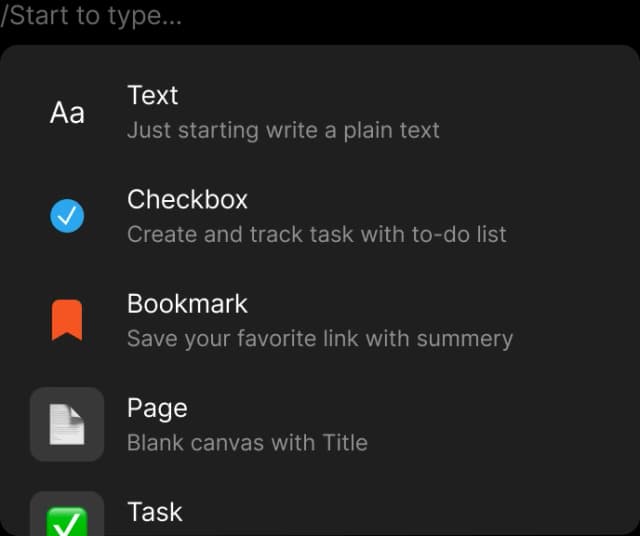
Anytype’s block menu shows the content types available while writing a note.
The Anytype image demonstrates the available note-authoring blocks. Encryption, offline operation, and peer-to-peer sync are product architecture claims supported by Anytype's official documentation rather than by the screenshot.
Feature comparison
The table below is the proof surface for this comparison. It covers the 6 criteria above.
| Atlas | Anytype |
|---|---|
| Citation grounding: claim-source-justification explains why a passage supports a claim | Citation grounding: source links or manual citations, depending on setup |
| Knowledge Maps: deconstructs each paper into claims and evidence ✓ | Knowledge Maps: manual paper objects and notes |
| Privacy model: Atlas uses a cloud-hosted workspace ✗ | Privacy model: Anytype is local-first, end-to-end encrypted, and peer-to-peer ✓ |
| Typed objects: sources, projects, chats, maps, and notes | Typed objects: flexible object types, relations, sets, and collections ✓ |
| Offline access: cloud surfaces need a live connection ✗ | Offline access: local-first workspace works offline ✓ |
| Migration: markdown notes and PDFs import as sources | Migration: markdown and JSON export from Anytype |
Table 1: Atlas vs Anytype feature checklist for source links, maps, privacy, objects, offline use, and export.
How is Atlas different?
Atlas and Anytype both help with reading and reasoning over sources. They diverge on 3 points that decide whether the output is easy to defend later.
Visual maps for papers and projects
Atlas builds 2 maps as you read. A Knowledge Map turns one paper into claims, proof, terms, and labeled links. The knowledge graph generator guide explains the broader visual-structure workflow. You see the paper's spine first, then open the source passages with a click.
A Semantic Map turns the project into a canvas of sources, notes, chats, and citations. The comparison of knowledge graph tools provides context for inspecting clusters and moving around a research corpus without rereading every source.
"It's like an ultimate GPT. I can finally see what I've read." Kyle Lao, CEO & Co-founder of MenSC Labs
Anytype does not have per-paper claim-evidence maps or new-angle views across a project. If you have tried to recover a paper weeks later, the Knowledge Map is the first payoff. Visual maps make a body of papers clear at a glance, and the Knowledge Map is the surface Atlas is built around.
Claim-level source reasoning
The hallucination problem in AI research tools is often citation misuse. The model may put a citation next to a claim that the cited passage does not justify. Atlas keeps claims close to citations. Use the checks in this AI citation checker guide to verify the cited passage in context.
The benchmark Atlas runs internally is the H/V ratio. It checks how often a generated sentence fails a passage-level citation check. Atlas targets H/V < 0.1 on that benchmark. We publish the Verifiable AI Research methodology.
Anytype's answers may include citations or links without the same claim-justification surface. That distinction may add little to casual Q&A. For a thesis sentence, a brief paragraph, or a treatment summary, it can determine whether the answer is defensible.
Project context and boundaries
Anytype persists objects and their links inside its spaces. Atlas organizes sources, notes, chats, maps, summaries, and citations inside each research project.
Atlas does not automatically carry source or chat context into another project. Keep one corpus together when it supports the same research question. Split projects when the evidence bases differ. A synthesis matrix can help define that evidence boundary before import.
Comparing Atlas and Anytype
Both tools touch a researcher's daily work, but they live in different lanes. Atlas is for paper maps, project views, cited AI answers, and reuse within a corpus. Anytype is for typed objects, private notes, and peer-to-peer sync.
Anytype is broader on privacy and local ownership. Atlas is deeper at the citation surface. The sections below compare paper structure, project view, cited answers, paper notes, and reuse. Each table includes at least one row where Anytype wins or ties.
Paper deconstruction
The Knowledge Map is Atlas's per-paper view. It turns a paper into claims, evidence, and labeled links. Node text is drawn faithfully from the paper's own language. Breadcrumbs let you move from the high-level thesis to a specific paragraph.
| Atlas | Anytype |
|---|---|
| Multi-level argument structure ✓ | Typed objects per paper with manual relations |
| Labeled relations (motivates, causes, enables) ✓ | ✗ |
| Faithful-to-source node text ✓ | ✗ |
| Hierarchical breadcrumbs ✓ | ✗ |
| ✗ | Local-first typed-object notes ✓. Anytype stores and organizes. Atlas deconstructs arguments |
Table 2: Atlas vs Anytype on paper maps, argument structure, and typed-object notes.
Good to know: The bottom row belongs to Anytype. Atlas does not ship that surface. The Knowledge Map helps when you need a paper's argument weeks after you first read it. Topic chips alone are no longer enough.
Project and corpus views
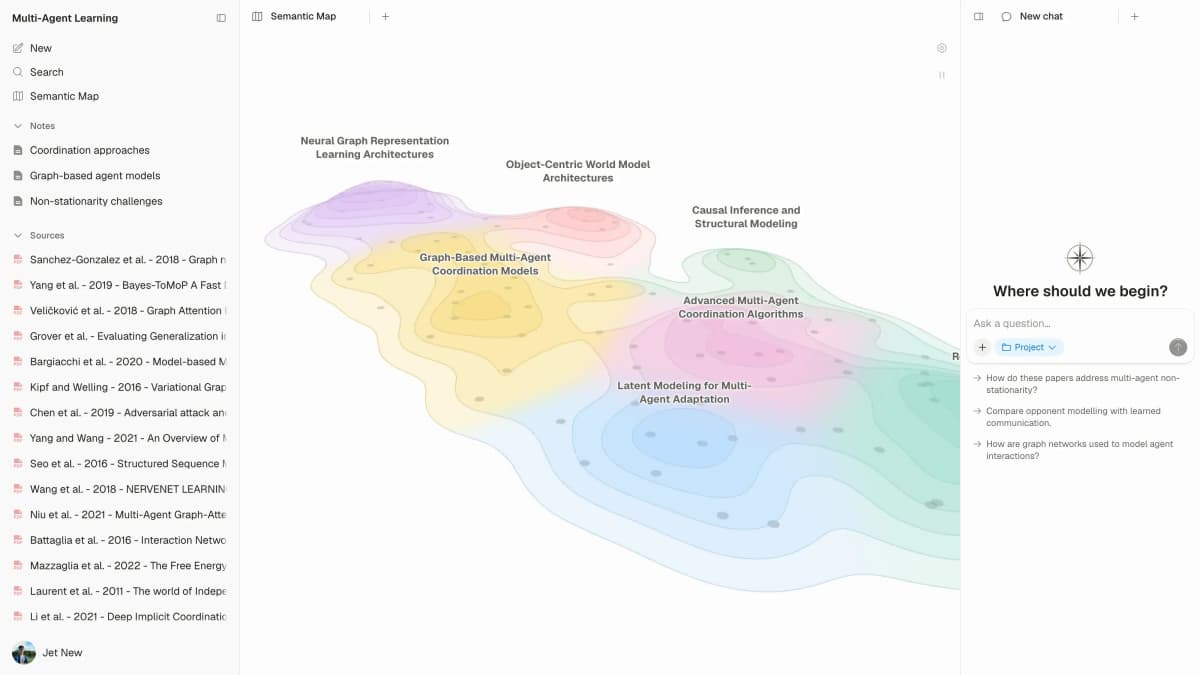
The Semantic Map is Atlas's per-project view. It places sources, notes, chats, and citations together. Related items cluster by topic. You can view the same project under a new topic angle without re-ingesting anything.
| Atlas | Anytype |
|---|---|
| Spatial embedding of sources + notes + chats ✓ | Object graph + sets + collections |
| Auto-labeled topic clusters ✓ | ✗ |
| Topic-angle re-projection ✓ | ✗ |
| Project-scoped research context ✓ | Space-scoped object graph ✓ |
| ✗ | End-to-end encryption + P2P sync ✓. Anytype leads on privacy. Atlas leads on research depth |
Table 3: Atlas vs Anytype on project maps, topic clusters, and encrypted object graphs.
Good to know: Anytype's strength on that row is genuine. If your work depends on it, that is the boundary. The Semantic Map helps when 200 papers stop being a folder and start being a corpus. You can view the same papers from different angles without rereading.
Citation-grounded answers
Atlas produces cited answer triples. You get the claim, the passage, and why the passage supports the claim. You can jump to the source paragraph, read the highlighted lines, and check the logic.
| Atlas | Anytype |
|---|---|
| Cited reasoning triples ✓ | ✗ |
| Reasoning traces (why this passage supports this claim) ✓ | ✗ |
| Jump-to-source with passage highlight ✓ | ✗ |
| H/V ratio < 0.1 benchmark published ✓ | ✗ |
| ✗ | Open-source and self-hostable ✓. Anytype's open license is a real advantage. It has no bearing on citation depth |
Table 4: Atlas vs Anytype on cited answers, H/V ratio checks, and Anytype's open license.
Good to know: Both tools have a citation surface. Atlas also explains why a passage justifies a claim. That explanation may add little to everyday Q&A, but it can determine whether a thesis sentence or brief paragraph is defensible.
Literature-grounded annotations
Atlas marks up each paper on ingest. Citations inside the paper become first-class objects. When the cited source is open access, Atlas pulls in the relevant passage. You can then see how the paper builds its case across sources without leaving the document.
| Atlas | Anytype |
|---|---|
| Auto-annotate on ingest ✓ | Manual notes on typed objects |
| Multi-citation synthesis (how citations build the argument) ✓ | ✗ |
| Resolve cited sources (open-access) ✓ | ✗ |
| Exact passage / page / paragraph anchors ✓ | ✗ |
| ✗ | Free for personal use ✓. Anytype's free tier is a real pricing advantage. It does not affect the annotation depth |
Table 5: Atlas vs Anytype on paper notes, source markup, and Anytype's free personal tier.
Good to know: Atlas resolves citations inside the paper you are reading. When a paper cites an open-access source, Atlas pulls in the cited passage. The feature shows how one paper builds its case from the sources it cites.
Project context and source reuse
Atlas lets sources, notes, chats, Knowledge Maps, and Semantic Maps share context inside one project. Anytype keeps an object graph that can span the objects and relations in a space.
| Atlas | Anytype |
|---|---|
| Sources, notes, chats, and maps share project context ✓ | Objects and properties share a space graph ✓ |
| Citations stay connected to project evidence ✓ | Object links and properties persist ✓ |
| Project contexts stay isolated by design | Spaces can be separated by purpose |
| Sources can be reused by uploading them to another project | Objects remain available inside their Anytype space ✓ |
| ✗ | Full data ownership ✓. Anytype gives you full control of your data vault. That does not extend to cross-source reasoning |
Table 6: Atlas vs Anytype on project context, source reuse, and full data ownership.
Good to know: Atlas project isolation prevents unrelated evidence from silently entering another project's chat or maps. Anytype's space graph is broader and more customizable. Choose the boundary that matches how you organize research.
Price comparison
Atlas is a paid product. There is no perpetual no-cost plan. The free sample gives you 10 sources and 5 lifetime AI chats. After that, Atlas Pro is $20/mo or $204/yr. Anytype's current membership page lists a free tier plus paid storage and identity tiers.
At the paid Atlas tier, the product includes Knowledge Maps, Semantic Maps, and cited answers. The price covers those research surfaces as well as chat usage.
| Atlas | Anytype |
|---|---|
| Free: ✗ (evaluation sample only: 10 sources · 5 lifetime AI chats) | Free: Free for personal use, open-source ✓ |
| Pro: $20/mo or $204/yr with unlimited AI chats and unlimited sources | Paid: Network plans for storage and team use (pricing varies) |
| Pro unlocks Knowledge Map, Semantic Map, and cited reasoning ✓ | ✗ |
Table 7: Atlas vs Anytype pricing for Atlas Pro, Anytype's free tier, and paid network plans.
The evaluation sample includes 10 sources and 5 lifetime AI chats. That is enough to upload one paper and test its Knowledge Map before you choose a paid plan.
When to choose Atlas or Anytype
Choose by the requirement that would make the other tool unusable, then test the winning workflow on one representative paper.
- Want paper structure deconstructed multi-level? Go with Atlas. (Knowledge Map)
- Want answers that explain how each citation justifies the claim? Go with Atlas. (cited reasoning)
- Want maps, notes, chats, and citations in one research project? Go with Atlas.
- Want encrypted local notes with full data ownership? Go with Anytype.
- Want open-source, privacy-first PKM? Go with Anytype.
- Tied: typed-object paper database with full local control. Both work, with different priorities. The wedge only opens once you build a corpus you'll return to.
If Atlas fits your research job, test it with one paper first. Compare its source trail with your current Anytype workflow before you move a larger set.
What if Notion is shortlisted?
If Notion is also on your list, read the Atlas vs Notion comparison. It compares a general workspace with a research project built around its sources.
Recommendations by user type
The right choice depends on what you read, how closely you must check the result, and whether the files must stay on your device.
Choose Atlas for source-grounded synthesis inside a focused research project. Choose Anytype when local ownership or a flexible object model is the deciding requirement.
Roles and research stages
- PhD researchers: Atlas. In years 1–2, the Knowledge Map helps you recover each paper without rereading it. In thesis years, cited reasoning keeps each thesis sentence anchored to a passage. Keep the dissertation corpus in one focused Atlas project so its sources, notes, chats, and maps share the same evidence base.
- Students doing literature reviews and thesis research: Atlas, scoped to dissertation, thesis, and literature review work. The Knowledge Map helps recover a paper's structure, while a focused project keeps the relevant sources and citations together across semesters.
- Knowledge workers (consultants, analysts, PMs, journalists): Atlas when you read reports and papers for client work. Use Anytype for adjacent jobs it handles well. The citation trail is the difference between a slide you can defend in a meeting and a slide you cannot.
- High-stakes personal research: Atlas when cited reasoning and source-derived project maps matter. Anytype when encryption and full data ownership are must-haves.
Anytype is strongest when the workspace itself is the product. It gives you private objects, local storage, and a system you tune over time. Atlas is stronger when the recurring job is reading sources, recovering arguments, and defending a synthesis months later.
The practical test is whether the same papers belong to one continuing research question. If they do, a focused Atlas project keeps its evidence and citation trail together. For independent notes or unrelated topics, Anytype's flexible workspace is lighter.
Migrating from Anytype
Anytype's data model is built around typed objects. Its pages are blocks, and you can add custom object types, relations, and sets/collections.
Storage is local-first, with encrypted local data and optional network synchronization.
Anytype's import and export guide lists markdown and Any-Block JSON among its desktop export formats. For a move to Atlas, markdown is the practical path for prose. JSON is useful only when you need relation data as flat fields.
Treat the move as a selective research-corpus migration rather than a replacement for every Anytype object.
What migrates cleanly
Page bodies migrate cleanly. Notes, ideas, reading notes, and daily logs come across as markdown files. Atlas imports supported files as sources. This overview of PDF research workflows shows where paper uploads fit.
PDFs attached to Anytype objects can be re-uploaded to Atlas. Each processed PDF can support a Knowledge Map and cited project chat. Tags and simple fields such as author, year, and status survive only when they remain in the imported text. Atlas does not convert them into Anytype-style custom object properties.
What stays Anytype-specific
Custom object types do not migrate as objects. Atlas uses sources, projects, chats, Knowledge Maps, Semantic Maps, and notes. It does not use user-defined object types. Sets and collections do not migrate either.
The closest Atlas match is the Semantic Map's topic view, which clusters by meaning rather than by a manual filter. Custom relations become flat fields instead of links. End-to-end encryption and local-only storage remain Anytype-specific because Atlas runs in the cloud.
A practical migration sequence
Export your Anytype workspace as markdown and ZIP, then pull out the PDFs. Upload a representative batch to Atlas and confirm that each source processes correctly before moving the rest.
Group imported material around each research question rather than its file type. Once the corpus is in, synthesize the relevant sources and inspect the citations before relying on the result.
Keep the Anytype vault as a cold archive for material that does not need cited reasoning or Knowledge Maps.
Literature review example
Here is the walkthrough. You are writing a review section on RAG for science Q&A. You have 18 papers and need about 800 words with citations you can defend.
Atlas workflow
In Atlas, upload the 18 PDFs to a new project and wait for source processing to finish. Open each available Knowledge Map to inspect the paper's claims, evidence, terms, and labeled links. Return to the source paragraph whenever exact wording matters.
Open the Semantic Map after the sources finish processing. The papers can cluster around concepts such as retrieval method, benchmark, error rate, and domain. Use those clusters to frame a question about what each paper says about citation grounding.
Then ask a synthesis chat what the papers agree on and where they differ. Each cited claim gives you a path back to its source passage. Check the highlighted lines before moving the supported point into your draft.
This workflow reduces repeated navigation, but you still own the interpretation and final wording.
Anytype workflow
In Anytype, create a Book or Paper object type, add 18 objects, attach the PDFs, and write reading notes in each body. Relations, backlinks, and filtered queries can connect the papers and surface shared tags.
Anytype stores the PDFs and your authored structure. It does not provide Atlas's Knowledge Map, Semantic Map, or claim-justification surface. You can build a rigorous review in Anytype, with the synthesis carried by your notes and links.
Choose by corpus sensitivity
Anytype is stronger when the 18 PDFs are sensitive. Think clinical notes, legal drafts, or unpublished collaborator material. Its local-first encrypted storage keeps them off a central cloud by design.
It is also stronger when you want Book, Author, Lab, and Funding Source as first-class typed objects with custom relations.
Anytype is a PKM tool for daily notes, journals, and databases in a way Atlas is not. The trade is research depth versus the breadth of a private database. Pick the side that matches the corpus and its privacy requirements.
When Anytype is the right call
There are research and PKM jobs where Anytype is the right tool. Four cases are clear.
Offline work
Choose Anytype for local-first or offline-first work. If your laptop is often offline, Anytype is built for that. This covers fieldwork, travel, and secure sites. Atlas requires a live link to the cloud surfaces.
An encrypted vault
Choose Anytype for an encrypted vault. If the corpus contains sensitive material, Anytype's documented privacy and encryption model is the better fit for a client-controlled key requirement.
Health notes, legal drafts, private journals, and unpublished manuscripts belong here. Atlas is not a local-only, client-side-encrypted vault. For that hard privacy rule, Anytype wins outright.
Flexible custom data models
Choose Anytype for flexible custom data models. If you want typed objects for Books, People, Labs, Funding Sources, Daily Logs, or Habits, Anytype is more expressive. Atlas is built around sources, projects, chats, maps, and notes. It is built for research. Anytype is built for flexibility.
Peer-to-peer sync
Choose Anytype when you need local-only or self-hosted operation. Anytype's terms of use describe both network options. That is Anytype's lane.
If any of these 4 requirements are mandatory, choose Anytype. Atlas starts to matter for deep research on a corpus you will revisit. It is not the fit for generic PKM with strict privacy.
Objections and final decision
Is migrating hundreds of objects worthwhile?
Probably not for daily notes, journals, or contact records. Move only the PDFs and reading notes that benefit from maps or cited synthesis, and keep Anytype as the home for everything else. The move stays bounded when it covers only material that benefits from Atlas's research surfaces.
Can Atlas citations export?
Test Atlas's available export paths with one representative answer before choosing it as part of a long-term archive. Knowledge Maps and Semantic Maps are Atlas-native surfaces, so they do not become Anytype objects. When Anytype remains the archive, preserve the original PDFs and authored notes there. Atlas can then serve as the analysis workspace without assuming every generated surface will round-trip.
Does Atlas provide local ownership?
Atlas runs in the cloud and does not store project material in a client-side, end-to-end-encrypted vault. Anytype is the stronger choice when that ownership model is required. Atlas is built for deep research where cited synthesis justifies the cloud trade, and its scope is narrower than general knowledge management.
Final comparison workflow
Choose Atlas when your decision depends on tracing synthesized claims back to passages across a research corpus. Choose Anytype when local ownership, offline access, or flexible typed objects are the requirements that cannot move.
Use the evaluation sample on one real paper first. Run a Knowledge Map, ask one cited question, and check whether the source trail is worth the cloud trade-off before moving more material.
Ask cited questions across your papers
Use Atlas for source-backed synthesis and Anytype for private local notes.