

A research paper organizer should tell you where a PDF lives, why you saved it, and what to do next. Keep one reference manager as your main library. Give each paper one state: inbox, screened, reading, cited, or archived. Add another tool only when the library cannot do a job you need.
The same method works for a short reading list and a large literature review. Choose the library that works with your writing app, then add other tools only as needed.
Atlas helps compare a chosen set of papers. Zotero, Paperpile, Mendeley, and EndNote organize reference records and create the final bibliography.
For the wider research process, including discovery and drafting, read our guide to AI for literature reviews.

Ask cited questions across your paper collection
Organize in Zotero, then compare evidence across focused papers in Atlas.
How a Research Paper Organizer Works
Start with one home for paper records and PDF files. Every new paper enters an inbox. Decide whether it fits your question, read the papers that matter, link used papers to a draft or claim, and archive the rest.
Zotero's guide to collections and tags shows the difference. A collection answers, "Which project needs this paper?" A tag records a detail you will use again, such as method, group studied, theory, or reading state. A note answers, "Why does this paper matter?" This keeps folders simple.
You can change tools later. Keep the same five states and basic paper details.
A Five-Stage Organizer Workflow
A paper may belong to several projects, but it should have one current state.
1. Inbox
Every new paper enters the inbox, whether it came from a browser, DOI search, database export, or PDF upload. Do not build many folders yet. Check the title, authors, year, journal or event, DOI or stable link, and the attached PDF.
Move it out when those details are correct and it belongs to a project or the archive. Keep papers with missing details in the inbox until you fix them.
2. Screened
Read the title and abstract with your research question in mind. Mark the paper as include, maybe, background, or exclude, then write one sentence explaining why. Months later, that sentence will help more than a long tag list.
Move a paper to reading if it could change a claim or method. Archive it if it is off-topic, a duplicate, unavailable, or too weak for the question.
3. Reading
Read with a clear purpose. Note the main claim, method, support, limits, and any page you may need later. Do not copy every highlight into another app. Keep enough text to remember why the passage mattered.
The UC Davis research workflow recommends project folders, tags, and a note on why the paper matters. Together, they help you find the file and remember your judgment.
4. Cited
Mark a paper as cited when it supports, changes, or challenges a claim in a real draft or review table. Record the draft, chapter, note, or claim that uses it. Software can format the reference, but you must still check that the passage supports your sentence.
This state does not mean the paper is good. It only links the paper to the place where you used it.
5. Archived
Archive duplicates, old versions, excluded papers, and sources you no longer need. Keep the record when its origin or your reason for excluding it matters. Delete only when you can recover the item easily.
An archive keeps the daily list short without erasing your review history. It should stay searchable but out of the reading queue.
For each paper worth keeping, record at least:
- Title, authors, year, journal or event, and DOI or stable URL.
- Active project or research question.
- Method, group or source studied, and topic.
- Current state: inbox, screened, reading, cited, or archived.
- One sentence on why the paper matters.
- A claim, page, passage, or note link once you use the paper.
What to Look For in an Organizer
Use this worksheet before comparing brands. It separates needs from nice extras and shows which data could be hard to move later.
Copy this decision worksheet
Answer each question with must have, nice to have, or not needed:
- How will papers enter the library: browser capture, DOI, database export, folders, or manual upload?
- Which paper details must stay correct for the reference styles you use?
- Do you need a built-in PDF reader, handwritten notes, or only a place to attach the file?
- Which writing apps need live references: Word, Google Docs, LibreOffice, or BibTeX?
- Will team members share records, files, notes, or only the final reference list?
- Must the library work offline, use local files, or sync through a named service?
- Which formats must leave the tool: RIS, BibTeX, CSL JSON, XML, annotated PDFs, or notes?
- After saving a paper, do you need help finding related work, keeping project notes, or comparing findings?
The best general tool saves papers, works with your writing app, and exports your data with few handoffs. A comparison of four reference managers reaches a similar view: saving, sync, team use, writing, and moving data matter more than a long feature list.
Test five papers you know well. Include one with wrong details, one marked-up PDF, and one used in a real document. This small trial can expose bad imports and awkward writing tools before they affect a whole thesis library.
8 Research Paper Organizer Tools by Workflow
These products do different jobs. The first five can hold your main paper library. Notion stores project notes, ResearchRabbit finds related papers, and Atlas compares a chosen set after you save it.
1. Atlas for Cross-Paper Synthesis
Atlas works with sources inside a project. Add papers by an exact ID or upload PDFs, wait for processing, ask a focused question across them, and open the cited text behind the answer.
This starts after you have chosen the papers. Atlas does not maintain reference styles or the final reference list. Use it to compare methods, find conflicts, or write notes that keep each paper's findings separate.
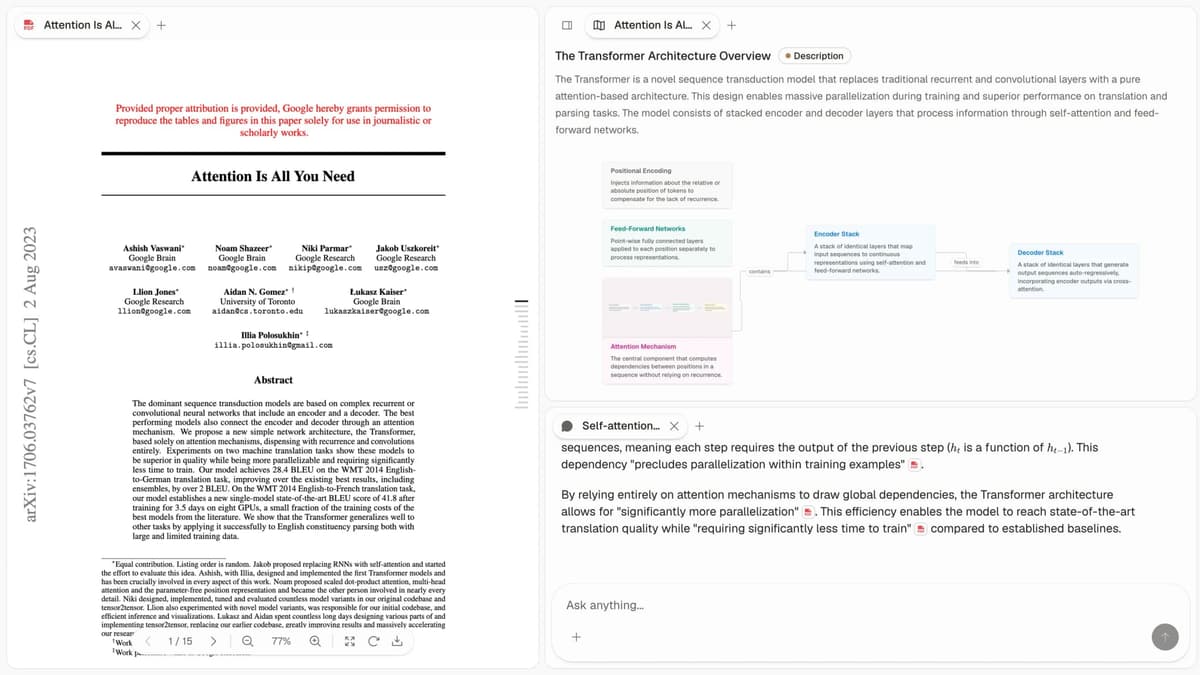
The final section shows this handoff and how to check an answer.
2. Zotero for a Flexible Default
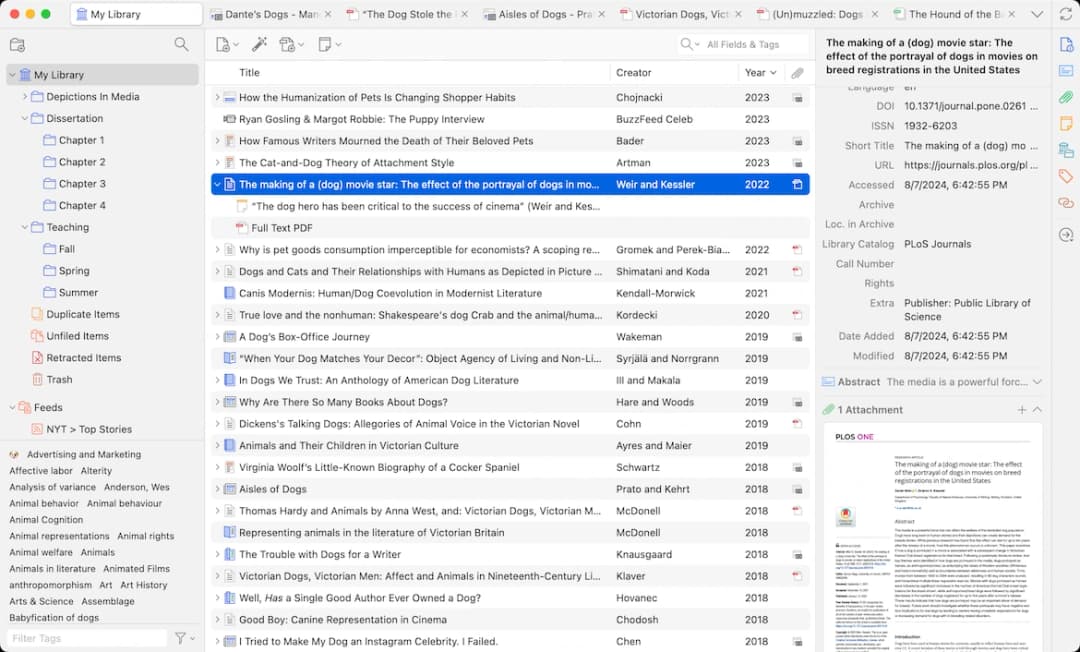
Zotero is a strong starting point for many researchers. It is free and open source. It saves records from the browser, sorts items with folders and tags, stores PDFs and notes, and inserts references in Word, LibreOffice, and Google Docs.
Choose Zotero when easy export and support for several writing apps matter. It can use local files, while optional file sync has a small free allowance and paid yearly storage plans. Check the current storage page before pricing a PDF-heavy library.
Zotero does not need to find every related paper or compare findings. Keep it as the main record and send chosen folders to other tools when needed.
If Zotero misses a required workflow or platform fit, compare the specific tradeoffs in our guide to Zotero alternatives before moving the library.
3. Paperpile for Google Docs Teams
Paperpile uses folders, labels, stars, duplicate checks, filters, and search. It works closely with Google Docs. Its current plans also list Word, BibTeX, browser saving, and links to databases.
The screenshot shows its web library. Project folders and reusable labels sit beside filters and search, so one paper can carry both project and topic details.
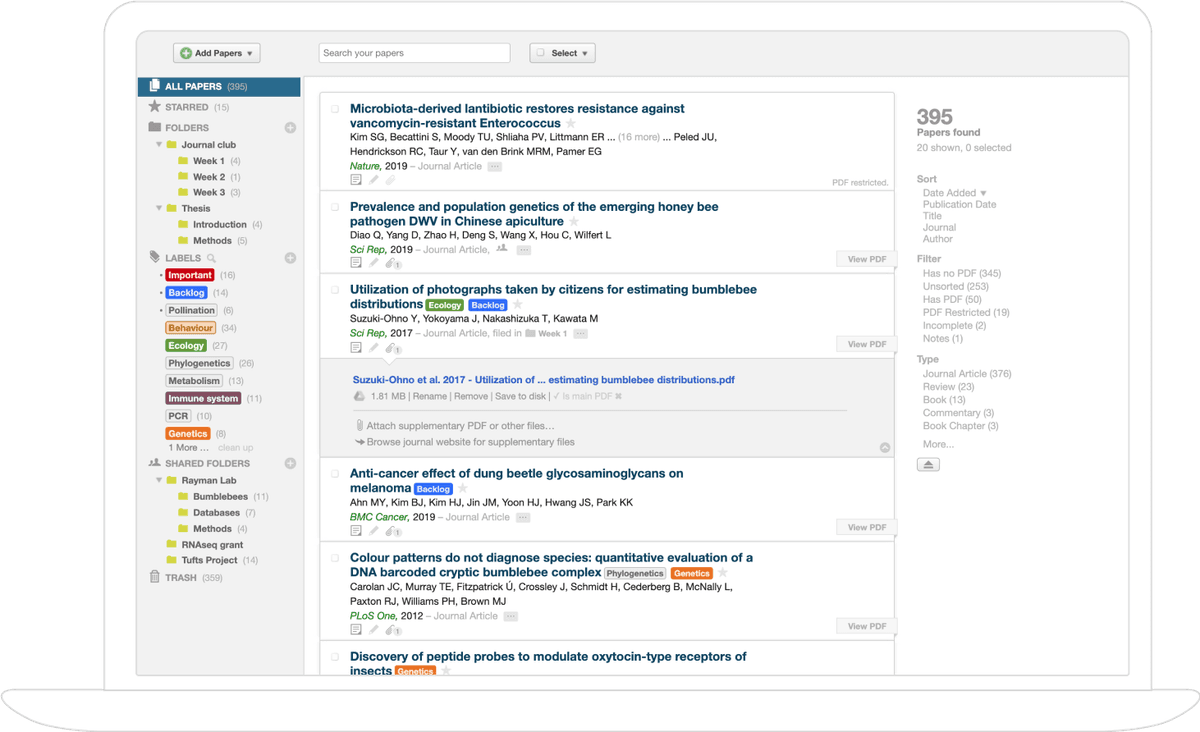
Paperpile has Regular and Expert plans, bills personal plans yearly, and offers a student or researcher discount. PDF search, notes, and shared libraries vary by plan, so use the current pricing page instead of an old monthly price.
4. Mendeley for Cloud Libraries
Mendeley Reference Manager imports PDFs and folders, saves from the browser, watches folders, stores files online, supports notes and shared libraries, and inserts references in Word. Its page currently lists 2 GB of free storage.
Mendeley fits a group that uses its cloud library and Word tool now. Test the current app instead of relying on memories of Mendeley Desktop, since its imports, exports, and features have changed.
Before committing, export a small library and make sure another manager can read its records, PDFs, and notes.
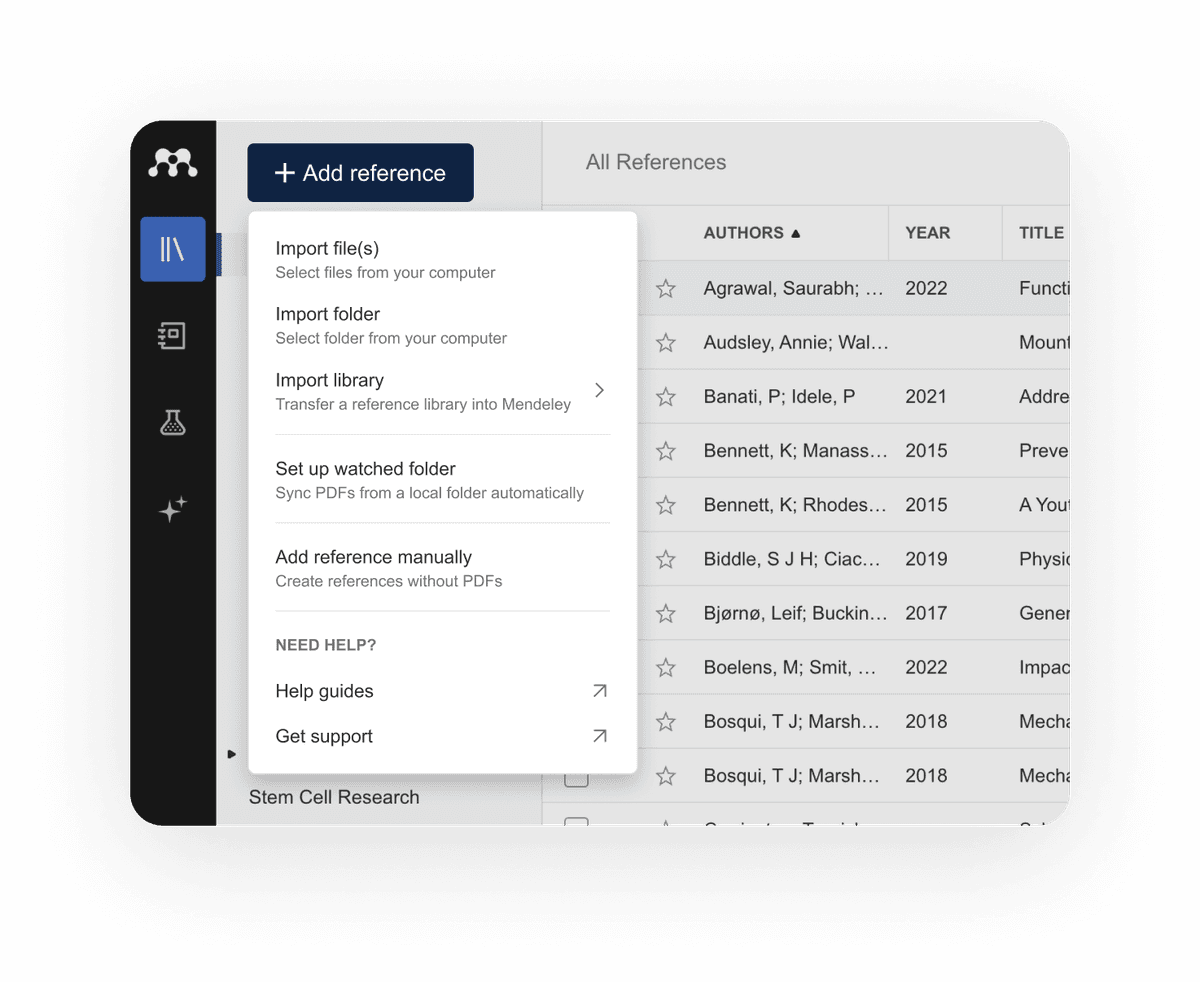
The source screenshot shows Mendeley’s import and watched-folder options beside its reference library. It illustrates the product interface, not every current capability.
5. EndNote for Institutional Workflows
EndNote is a large paper and reference manager. Its docs cover project groups, files, database search, team use, and Cite While You Write in supported writing apps.
EndNote makes sense when a lab, publisher, or school already uses it. Shared templates, support, and coauthor habits may matter more than the price.
If you would pay personally, check the current license and upgrade terms. If access comes through an institution, confirm what happens to the desktop library and online account when the affiliation ends.
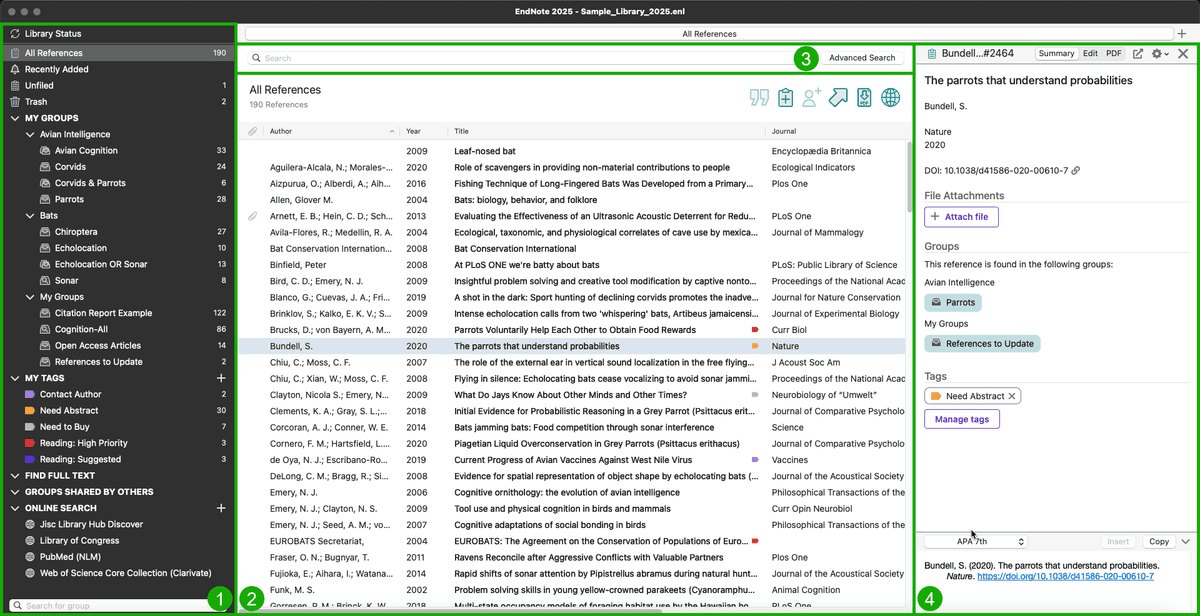
The EndNote 2025 library window shows groups, references, and selected-record details; controls may vary by platform and version.
6. ReadCube Papers for PDF Reading
ReadCube Papers focuses on reading PDFs. Its current pages describe a synced paper library, browser tools, notes, and SmartCite for Word and Google Docs.
It fits researchers who spend much of the day in papers and want related work, reading, notes, and references close together. It is another paid system, so test exports and marked-up PDFs with your own files.
Do not choose from screenshots alone. Import a paper with figures, extra files, and existing notes, then export it and inspect the result.
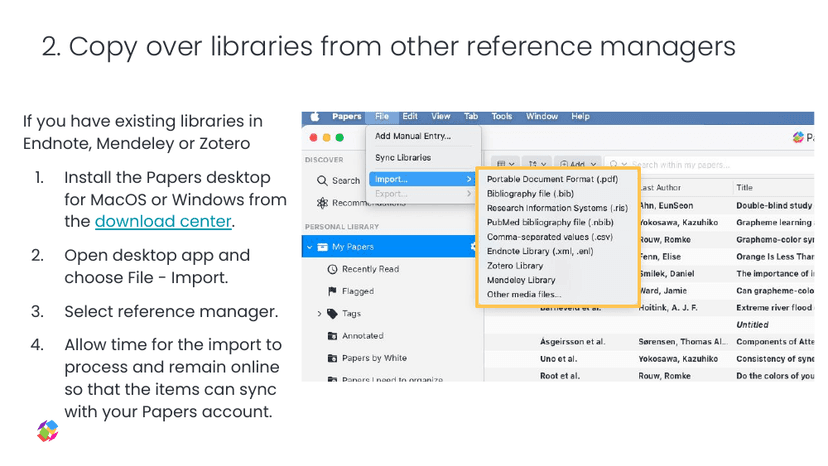
The 2025 Papers guide shows its desktop library and import menu, including migration from other reference managers.
7. Notion for Project Notes
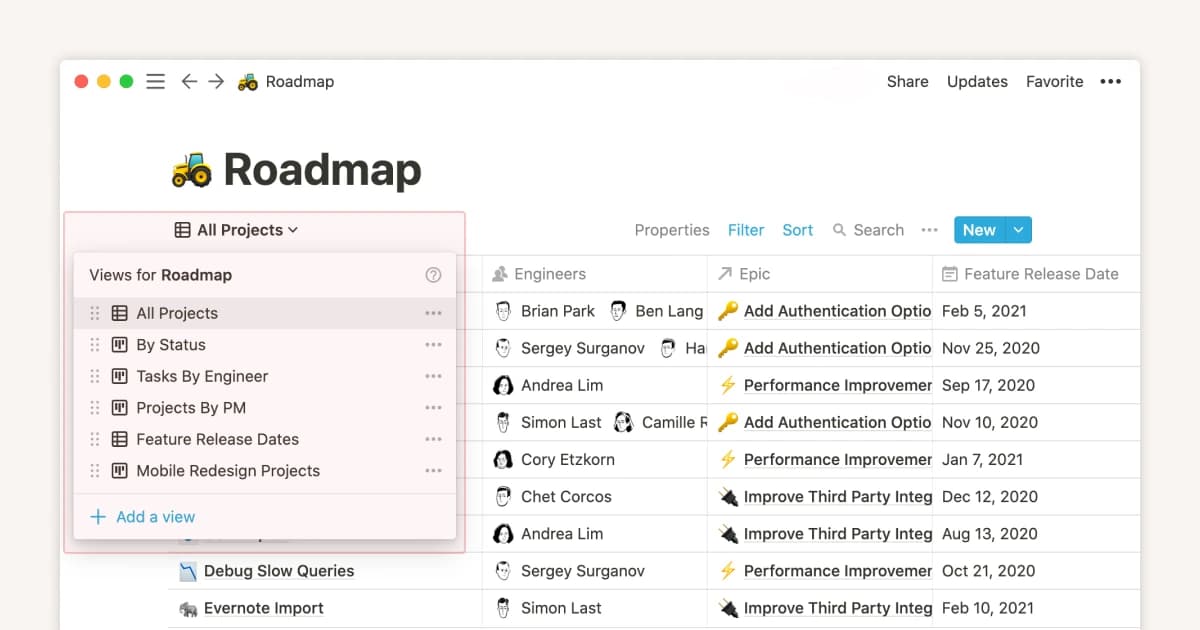
Notion databases can track papers as pages with fields, filters, groups, and several views. A board can show reading state. A table can show method, group studied, finding, and why the paper matters.
Notion helps when you need project context, not a new reference manager. It does not replace browser saving, record repair, reference styles, or automatic reference lists. Store the DOI and a link to the main library record so Notion does not become a second, conflicting library.
Use Notion for a review table or project board. Keep the main paper record in Zotero, Paperpile, Mendeley, or EndNote.
8. ResearchRabbit for Discovery Maps
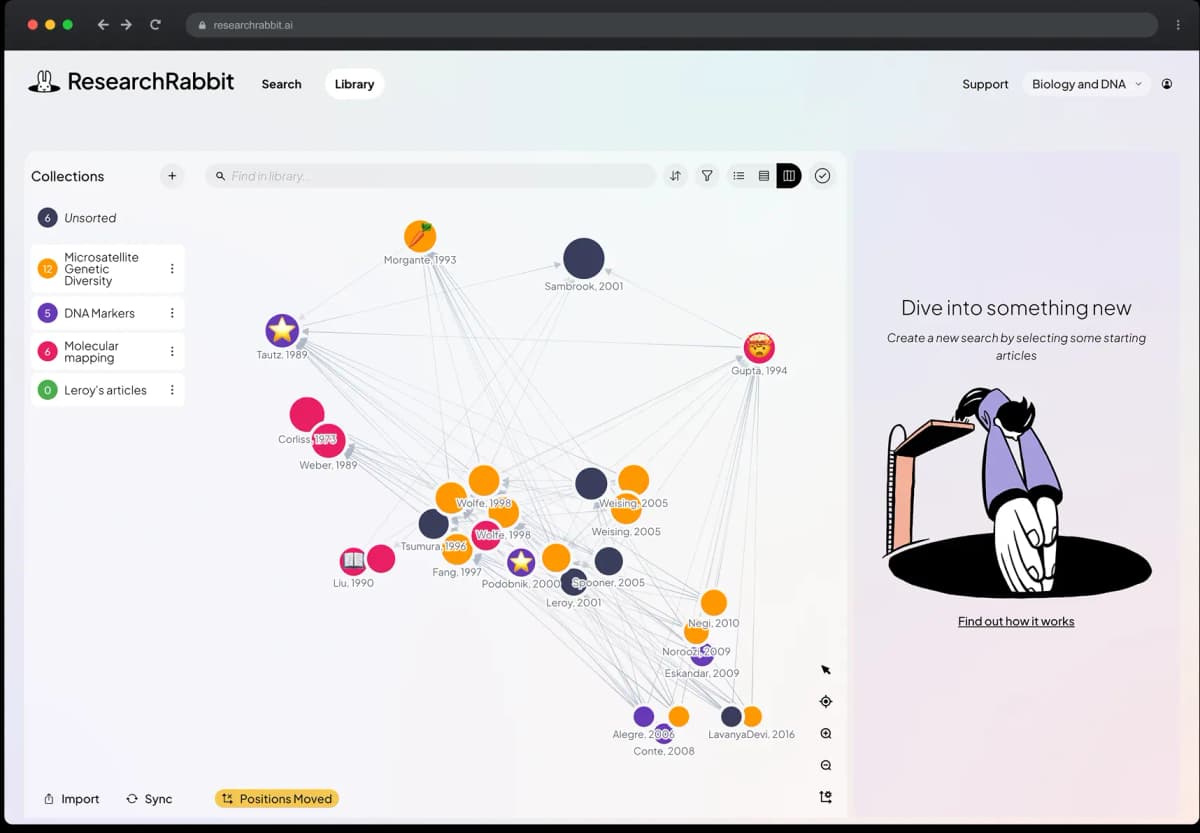
ResearchRabbit starts from a few papers and shows related work, authors, topics, suggestions, folders, and visual links. Its free plan covers core search and folders. Paid RR+ plans add controls for larger searches.
Use ResearchRabbit when you may have missed nearby papers or need to see how work cites other work. Send good candidates to the main library instead of keeping a second full copy.
Before adding a paper, check its title, authors, year, journal or event, abstract, and available full text.
Other Search Results
Search results also show three narrower products. They are outside the main list because their pages do not show the same full path from saving a paper to using it in a draft. Test 20 records before trusting one with a live library.
LitOrganizer
A SoftwareX paper describes LitOrganizer as a guided tool for pulling details from papers during a literature review. That is narrower than managing the main library across projects and writing apps.
PaperPilot
PaperPilot appears through its maintainer's code repository. Check the current release, supported imports, reference exports, and note handling before moving a live library.
Fynman
Fynman also appears in search. Start with a five-paper test, then check the records, PDFs, notes, search, and export with your own files.
Research Paper Organizer Comparison
The table compares each tool's role. Read it with your worksheet, especially the writing app and export needs that would be costly to change halfway through a project.
| Tool | Primary role | Best fit | Capture | PDF and notes | Citation output | Collaboration | Portability | Synthesis role |
|---|---|---|---|---|---|---|---|---|
| Atlas | Synthesis workspace | Focused cross-paper questions | Paper search and project sources | Source reading, notes, maps, cited answers | Keep final citations in a reference manager | Project workflow | Keep the reference manager authoritative | Compares evidence across processed project sources |
| Zotero | Reference manager | Flexible general use | Browser, DOI, files | Reader, annotations, notes | Word, Docs, LibreOffice, exports | Group libraries | Strong standard exports and local data | Use an added synthesis tool |
| Paperpile | Reference manager | Google-centered teams | Browser, databases, files | Plan-dependent search and annotations | Google Docs, Word, BibTeX | Plan-dependent shared libraries | Standard import and export formats | Use an added synthesis tool |
| Mendeley | Reference manager | Existing Mendeley and Word groups | Browser, folders, files | Reader, annotations, notebook | Mendeley Cite for Word | Shared libraries | Test current export with your data | Limited compared with specialist tools |
| EndNote | Reference manager | Institutional and Word workflows | Databases, files, online search | Full-text library and attachments | Cite While You Write | Shared libraries and web tools | Test license and export requirements | Added research features vary by version |
| ReadCube Papers | Reference manager | PDF-heavy reading | Browser and file import | Strong reading and annotation focus | SmartCite for Word and Docs | Sharing features | Test annotations and exports | Discovery and reading support |
| Notion | Project-note database | Review matrices and project context | Manual or integrations | Page notes and file embeds | Manual citation workflow | Shared workspaces | Export needs a trial | Organizes extracted findings in a database |
| ResearchRabbit | Discovery tool | Citation-network exploration | Seed papers and library import | Collections and notes | Export to a reference manager | Shared collections | BibTeX and Zotero handoffs | Maps scholarly relationships |
Table 1: Eight tools compared across saving, writing, team use, export, and paper comparison.
Choose a Setup That Lasts
Pick the Primary Library
If you are starting a solo library, begin with Zotero. It saves records and PDFs, inserts references, and exports the library without a required app fee. Add another tool only when the same task keeps causing trouble.
For a lab that writes in Word, follow the team's existing setup. EndNote may fit a school that supports it. Mendeley may fit a group that uses it now. Zotero works when the team can agree on its shared libraries and Word tool.
For Google Docs, test Paperpile and Zotero in one shared file. Try edits from two people and create the reference list in the style you must submit. Choose the smoother result.
For LaTeX or BibTeX, test keys, updates, PDFs, and your real writing setup. Zotero supports reference export and community add-ons. A sample paper tells you more than a feature list.
Add Specialist Layers
Use ResearchRabbit to find related work, then send good papers back to the main library. Keep a Notion review table linked to that main record. Send a small paper set to Atlas when you need to compare findings, while the reference manager keeps the final list.
Researchers often change their folders and tags as new themes appear, then lose time copying those changes between apps. The LitSense workflow study supports flexible organization, notes at several levels, and clear paper states. A few tools with separate jobs handle this better than several competing libraries.
Test Before Moving the Whole Library
Do not move the full library first. Copy 20 records into a test folder. Include a book chapter, a paper with missing details, a marked-up PDF, an item used in a real draft, and a record with custom tags or reference keys.
Export the sample in a well-supported standard format, then import it into the new tool. Check:
- Titles, authors, dates, journals or events, IDs, and item types.
- Attached PDFs, supplementary files, and links.
- Highlights, comments, notes, and page links.
- Collections, tags, saved searches, and duplicate records.
- Reference keys and one reference list made from a real document.
- A second export from the new tool, so the next exit remains possible.
Keep the old library unchanged until the sample passes. Paper details may look right even when notes, item types, or reference fields have shifted. These errors become costly once the new library becomes the main copy.
If the test works, move one project at a time and keep a dated export from the old system. Our guide to reference tools for research explains how records move from a library into a draft.
Where Atlas Fits in a Paper-Management Stack
Role and Boundary
Atlas is not the main paper library. It is a workspace for searching and comparing a chosen set of papers after Atlas has processed them. The reference manager still owns the records, PDFs, reference keys, and final reference list.
Proof to Check Before Adopting It
Test Atlas with a small copy of papers you have screened:
- Add five papers: Use a title, DOI, arXiv ID, or PDF. Check each record, readable text, and processing status.
- Ask a test question: Try, "Compare the methods in these papers. For each one, list the method, support, limit, and source."
- Open the cited text: Check at least one citation for each main paper. Make sure the passage fits the claim, keeps nearby context, and does not hide a conflict.
- Fix weak claims: Narrow or change any claim with missing, weak, or mismatched support.
A citation means Atlas found related text. It does not prove that the passage supports every word or that the answer is ready to publish. You still need to read the source and make the final call.
A lasting setup gives each tool one job. Keep records, PDFs, and the final reference list in the main library. Use search tools to find related work. Keep project notes where the team can edit them. Use Atlas when chosen papers need a comparison with links back to their text. Next, read how to compare and combine research papers.
Ask cited questions across your paper collection
Organize in Zotero, then compare evidence across focused papers in Atlas.